
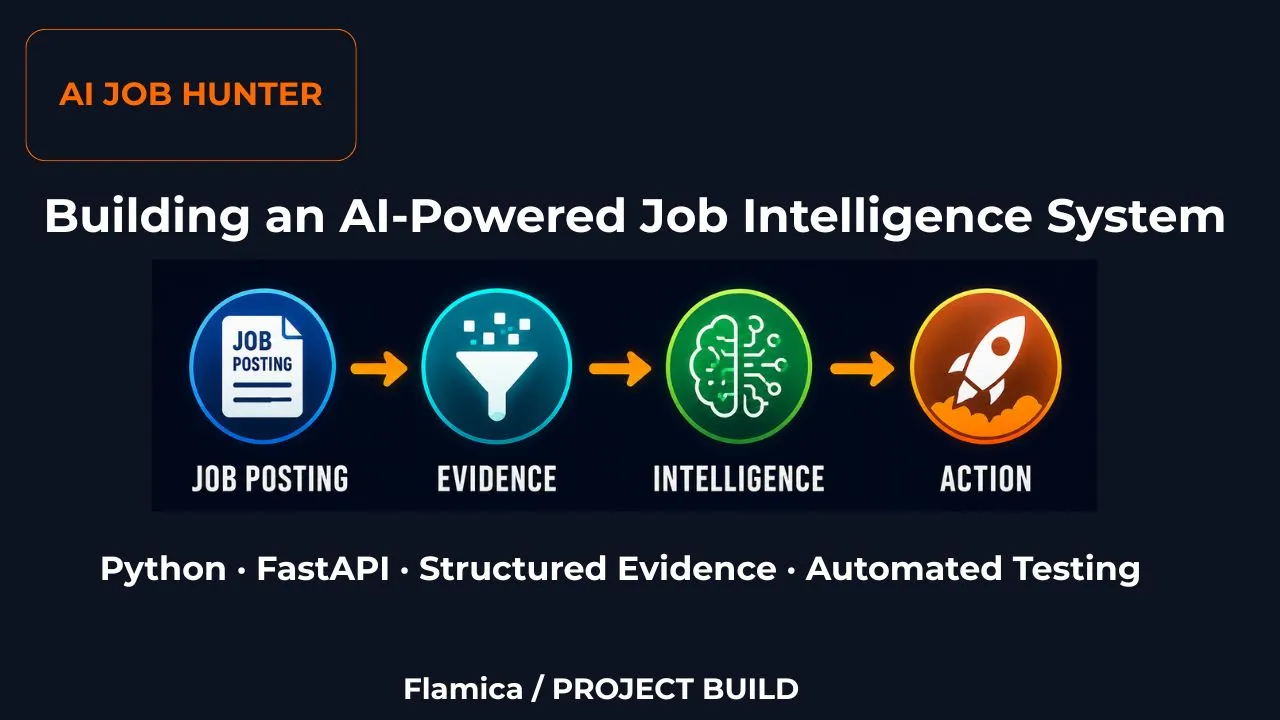
I Didn't Want to Build Another Job Search Tool
There are many websites in the market that help people find jobs.
So that wasn't actually the problem I wanted to solve.
What mattered to me was what happens to a job opportunity after it is found.
Is the company really the employer? Is the same opportunity posted somewhere else? Does the job actually match the person's skills? Can we find useful information about the company before applying?
That led to the idea behind AI Job Hunter.
I am building it as an opportunity intelligence system rather than another simple job-search interface.
The idea is to take messy job information and gradually turn it into something a person — or another automated workflow — can actually work with.
And I am building it one working piece at a time.
Where the Project Stands
Building — Evolving System
The first working foundation of AI Job Hunter is now running, and the system has continued to evolve beyond that initial Phase 1 implementation.
A Note on the Phase 1 Architecture
This section documents the first working version of AI Job Hunter.
Since then, the system has grown considerably. The original evidence-extraction pipeline became the foundation for a larger opportunity-intelligence workflow that now includes job acquisition, opportunity relevance, candidate suitability, a Top-25 review queue, and human review.
The architecture and API described in the sections below should therefore be read as the Phase 1 foundation, rather than a description of the complete system today.
At this stage, the system can take a job posting, preserve the original information, extract useful facts from it, and make those results available through a FastAPI API.
That may sound simple.
It is.
And that's intentional.
Before adding AI models, databases, automation platforms, and other services, I wanted to make sure the foundation worked properly.
So the Phase 1 workflow looked like this:
Job Posting
     ↓
Raw Document
     ↓
Evidence Extraction
     ↓
Structured Evidence
     ↓
FastAPI API
     ↓
JSON Response
Step 1: Save the Original Job Posting
The first question I had was surprisingly basic:
What happens to the original job posting once we start processing it?
I didn't want the system to immediately read the posting, extract a few facts, and then lose the original information.
So I created a RawDocument.
Think of it as the system's original copy of what came in.
A RawDocument records things such as:
- Where the information came from
- What type of document it is
- The original content
- The source URL, when available
- When the document entered the system
- A unique ID for the document
For example, if a job posting says:
Workflow Automation Specialist.

We need someone with Python, n8n and FastAPI.

This is a fully remote position.
The first thing AI Job Hunter does is preserve that information as a source document.
Nothing has been interpreted yet.
We are simply making sure we know what we started with.
Step 2: Turn the Job Posting into Evidence
Once we have the original document, we can start asking a more useful question:
What facts can we find inside it?
This is where the Evidence model comes in.
Instead of keeping everything as one large block of text, AI Job Hunter can identify individual pieces of information.
For example:
Job Title
Workflow Automation Specialist

Technology
Python

Technology
n8n

Technology
FastAPI

Remote Policy
Remote
Python · n8n · FastAPI
Fully remote position
Technology → Python
Technology → n8n
Technology → FastAPI
Remote Policy → Remote
Step 3: Build the Evidence Extraction Pipeline
With RawDocument and Evidence in place, I needed something to connect them.
That's the job of the Job Evidence Extractor.
Its job is straightforward:
Raw Job Posting
       ↓
Read the document
       ↓
Find useful facts
       ↓
Create Evidence objects
At this stage, the extractor can identify information such as job titles, technologies, skills, and remote-work information.
The important thing is that the extracted evidence keeps a connection to the original document.
That gives us a much better foundation for the later stages of the project.
Instead of simply asking AI:
"Is this a good job?"
we can eventually build a system that has actual information to work with.
This was the first evidence-extraction pipeline and became the foundation for the later opportunity-intelligence workflow.
Step 4: Test the Pipeline
I didn't want to assume that the pipeline worked just because the code ran.
So I added automated tests using pytest.
The tests check the individual pieces of the system and then check that they work together.
The current test suite covers:
- Creating a
RawDocument - Creating an
Evidenceobject - Extracting evidence from a job posting
- Checking that the API is running
- Sending a job posting through the API and checking the response
The current result is:
5 passed
This gives us an important safety net.
As AI Job Hunter becomes more complicated, we can run the tests again and quickly see whether a change has broken something that was already working.
Step 5: Give the Pipeline an API
At this point I had a working Python pipeline.
But there was another problem.
How does another application actually use it?
I didn't want the next part of the system to need direct access to Python code.
That's where FastAPI comes in.
FastAPI allows us to put a web API around the Python application.
In simple terms, another application can send AI Job Hunter a job posting and ask:
"Can you extract the useful information from this?"
AI Job Hunter processes the request and sends the result back as structured JSON.
The Phase 1 API exposed two initial endpoints:
GET  /health

POST /jobs/extract-evidence
The first checks whether the application is running.
The second sends a job posting through the evidence extraction pipeline.
Seeing the System Work
One of the useful things about FastAPI is that it automatically gives us interactive API documentation.
During development, I can open:
http://127.0.0.1:8000/docs
and interact with the API directly in a browser.
For example, I can send a job posting containing:
Workflow Automation Specialist

We need someone with Python, n8n and FastAPI.

This is a fully remote position.
The Phase 1 API processed it and returned structured evidence.
That gives us a simple way to see the pipeline working from outside the Python code itself.
The Phase 1 Architecture
At this point, the first part of AI Job Hunter looks like this:
The diagram shows the basic path a job posting takes through the system.
This architecture represents the initial Phase 1 foundation. Later stages extended it beyond evidence extraction into opportunity relevance, candidate suitability, human review, and preparation for tailoring.
The original information is preserved first. The extractor then turns useful information into structured evidence. FastAPI makes that capability available to other applications through an API.
The Technology Behind the First Version
The first working version uses:
Python — the programming language used to build the application.
FastAPI — the framework used to expose the application through a web API.
Pydantic — used to define and validate the structured data moving through the API.
pytest — used to automatically test the application.
Uvicorn — the server used to run the FastAPI application during development.
These are the technologies I have actually used in the current implementation.
Other technologies are planned as the system grows.
What Came Next
After the Phase 1 foundation was working, the project moved into the next stages of opportunity intelligence.
The current pipeline is only the foundation.
The larger system is intended to move toward something like:
Job Sources
     ↓
Data Collection
     ↓
Raw Documents
     ↓
Evidence Extraction
     ↓
Company Research
     ↓
Duplicate Detection
     ↓
Skill Matching
     ↓
Opportunity Scoring
     ↓
Recommendations
     ↓
Application Workflow
Technologies such as n8n, Supabase, Gemini AI, Playwright, and Next.js are part of the planned architecture.
They are not being presented as completed features yet.
I will add each one to the working system as I implement and test it.
That's an important part of this project.
I'm not documenting a finished product after the fact. I'm documenting the system while I build it.
Why Build It This Way?
There is a temptation with AI projects to start with the AI.
I decided to start with the data.
If we don't know what information entered the system, or where an extracted fact came from, it becomes much harder to trust whatever comes out at the other end.
So AI Job Hunter is being built from the inside out:
Preserve the information
          ↓
Extract the facts
          ↓
Test the pipeline
          ↓
Expose the capability
          ↓
Add automation
          ↓
Add AI reasoning
          ↓
Build the larger workflow
The objective is not simply to make AI find jobs.
The objective is to build a system that can understand an opportunity, explain why it is relevant, and eventually help move it toward an application.
This page will continue to evolve as each part of that system becomes real.
From Phase 1 to the Current System
The original Phase 1 work established the evidence-first foundation. The project then moved beyond extracting information from individual job postings and began evaluating opportunities in context.
Stage A introduced opportunity relevance. Stage B added candidate suitability. Stage C introduced explicit human review before the system prepares an opportunity for tailoring.
Stage B: Moving from Job Search to Candidate Suitability
The job offer looks relevant, so finding this opportunity, you may say, is a good start.
But then you need to consider the fact that a job search system might be able to aggregate hundreds of jobs, yet leaves you doing the grunt work; clarifying which opportunities are actually worth pursuing.
That is where AI Job Hunter moves into its next stage.
Stage A asks whether a job is relevant.
Stage B asks how suitable that opportunity is for the candidate.
Those are different questions.
The title, company, location or skills make a job appear very relevant to the search. However, once the candidate's proven experience, skills, interests and limitations are factored in, things may look different.
AI Job Hunter therefore keeps these decisions separate rather than collapsing everything into one score.
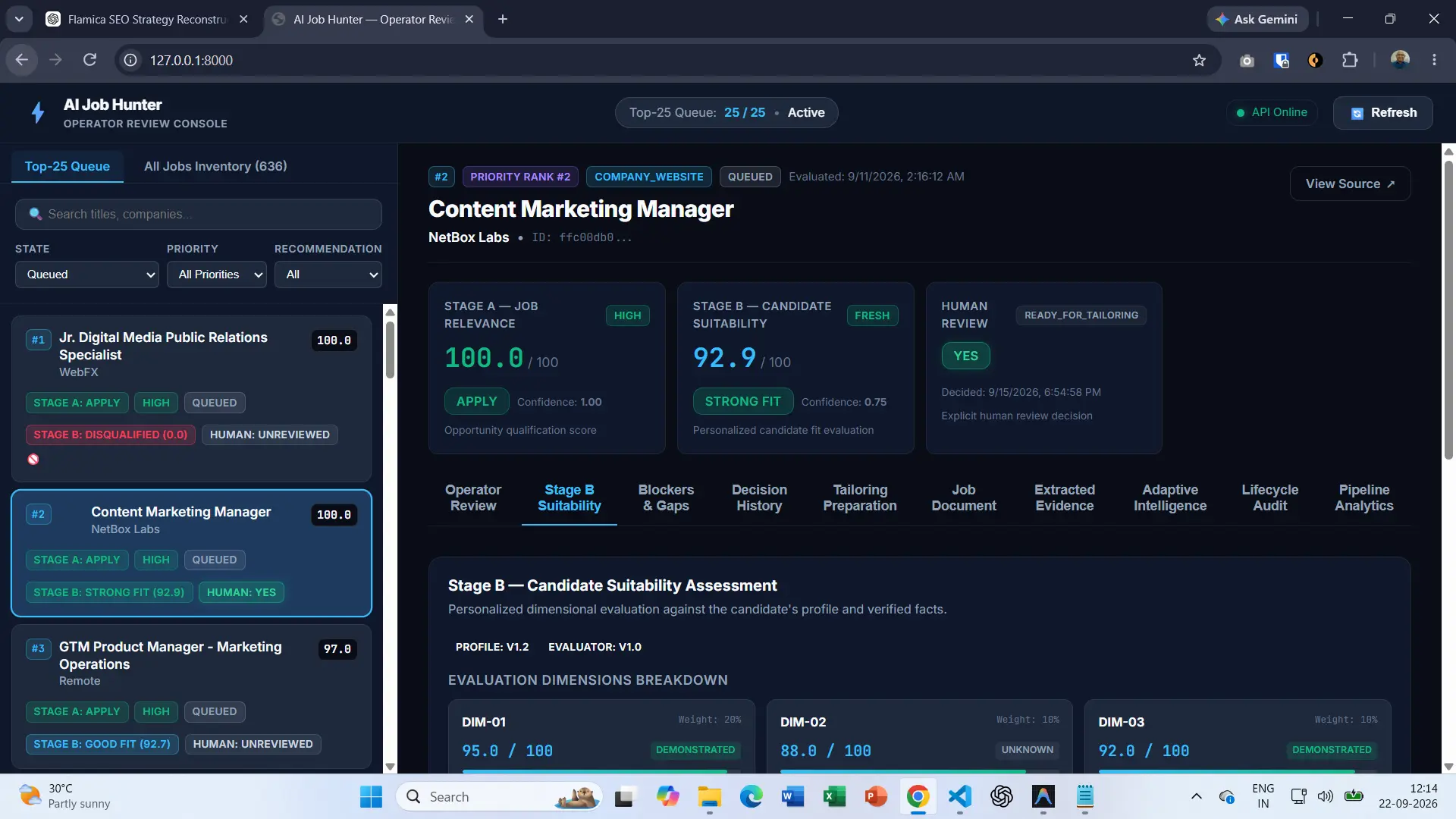
The current operator console makes that distinction visible. A selected opportunity can show a Stage A relevance assessment, a separate Stage B suitability assessment, and then a human review decision.
This creates a much more useful job search process:
Find opportunities. Determine which ones are relevant. Evaluate candidate suitability. Give a human the final decision.
The important part is that each step has a different job.
The Original Job Document Still Matters
Before Stage B can evaluate suitability, the system needs something reliable to evaluate.
That starts with the original job posting.
AI Job Hunter does not begin by throwing a job description into a model and keeping only the resulting summary. The original job document remains part of the opportunity record.
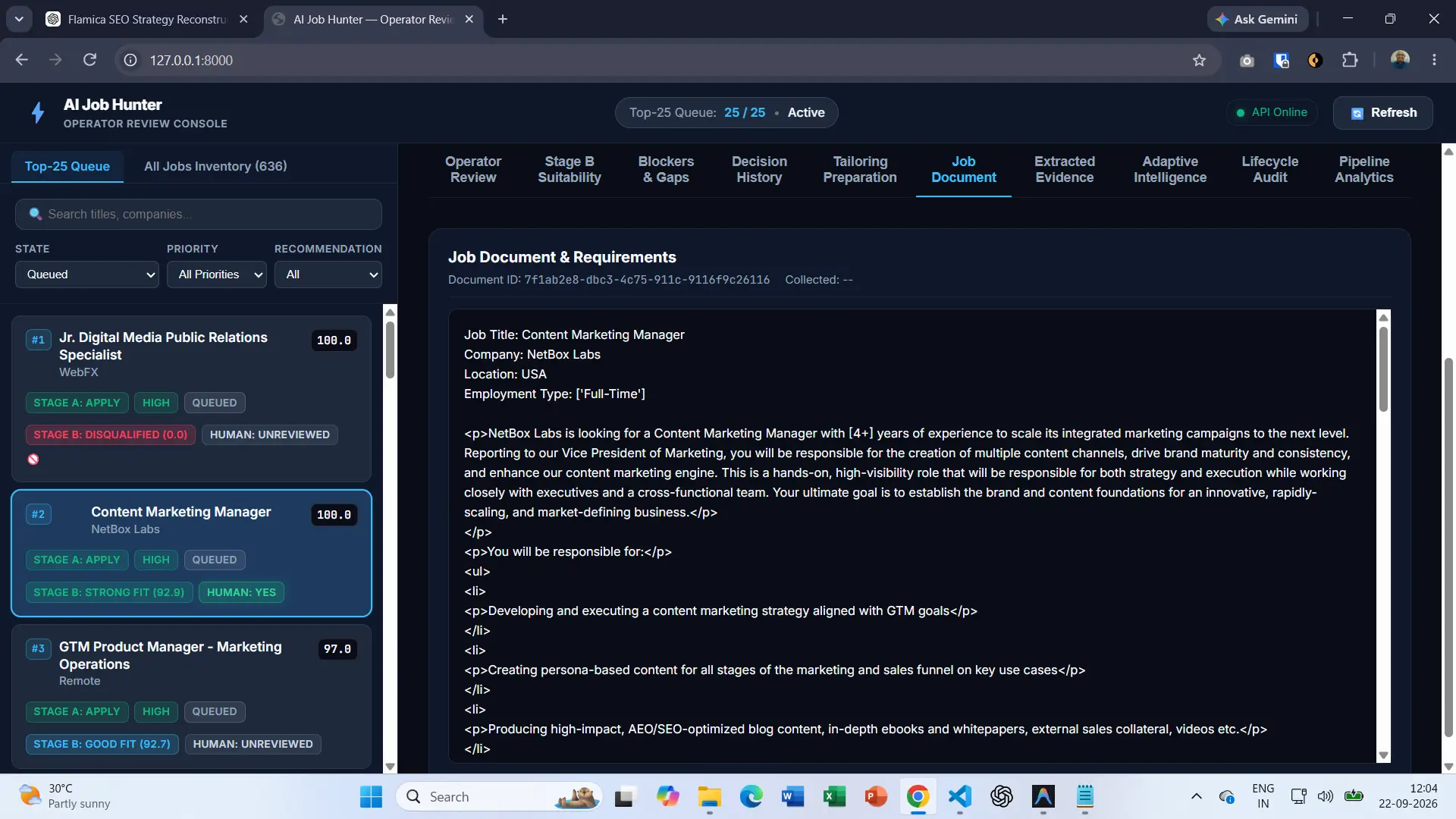
The current console exposes that document through the Job Document section.
For this Content Marketing Manager opportunity, the interface shows the job title, company, location, employment type and the original job description content.
That gives the later stages something important: a source to work from.
If an assessment says that a job requires a particular capability, experience level, employment arrangement or other condition, the system should be able to trace that assessment back to information contained in the opportunity.
This is one of the reasons the evidence-first approach from the first part of this project matters.
The job document is not just input for an AI model.
It is part of the evidence chain.
From the Job Document to Structured Evidence
The next step is turning useful information inside the job document into structured evidence.
This is an important distinction.
A raw job description is written for people. It may contain paragraphs, lists, HTML, headings, requirements and marketing language. A system needs something more structured if later stages are going to reason about the opportunity consistently.
AI Job Hunter therefore extracts signals from the job document and represents them as evidence.
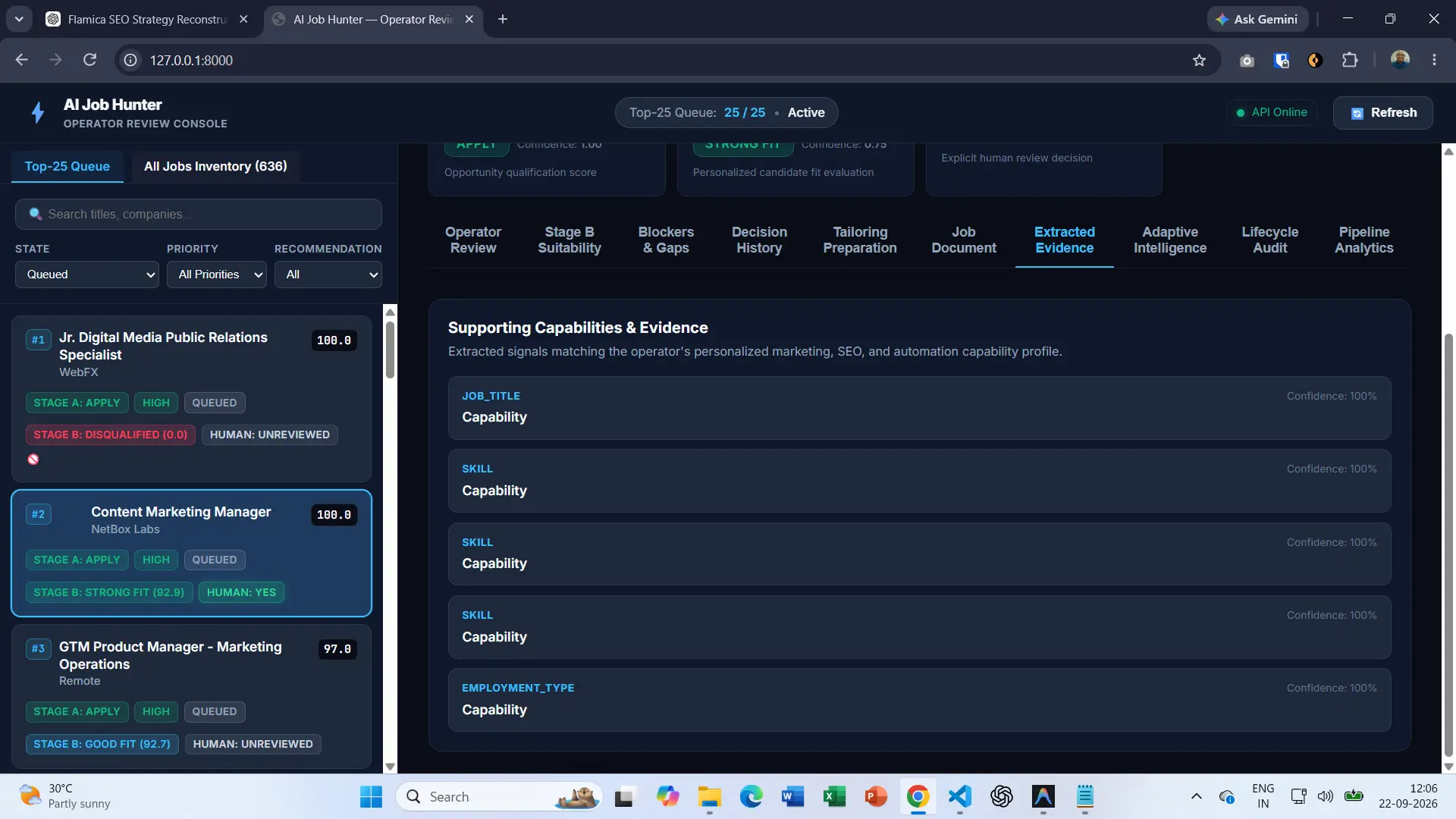
The current Extracted Evidence view shows this process in the operator console.
The evidence includes different categories such as job title, skills and employment type. Each extracted item can also carry a confidence value.
In the displayed opportunity, the visible extracted evidence items show 100% confidence.
This is not the same as saying that all inferences about the candidate are 100% certain.
These inferences lead to the confidence score of 100% for a specific extraction corresponding to what is being displayed by the interface.
That distinction becomes important when we reach Stage B.
Stage B Looks at Candidate Suitability
Once the opportunity has been structured, the system can ask a harder question.
Is this particular opportunity suitable for this particular candidate?
That requires more than matching a job title against a candidate profile.
The current Stage B implementation uses a dimensional evaluation. Instead of producing a single unexplained number, it breaks the suitability assessment into individual evaluation dimensions.
This makes the assessment easier to inspect.
For this Content Marketing Manager opportunity, the operator console shows a Stage B suitability score of 92.9 out of 100 and a result of STRONG FIT.
More importantly, the console exposes the dimensions behind that assessment.
That gives the operator an opportunity to look beyond the headline score.
Breaking the Suitability Assessment into Dimensions
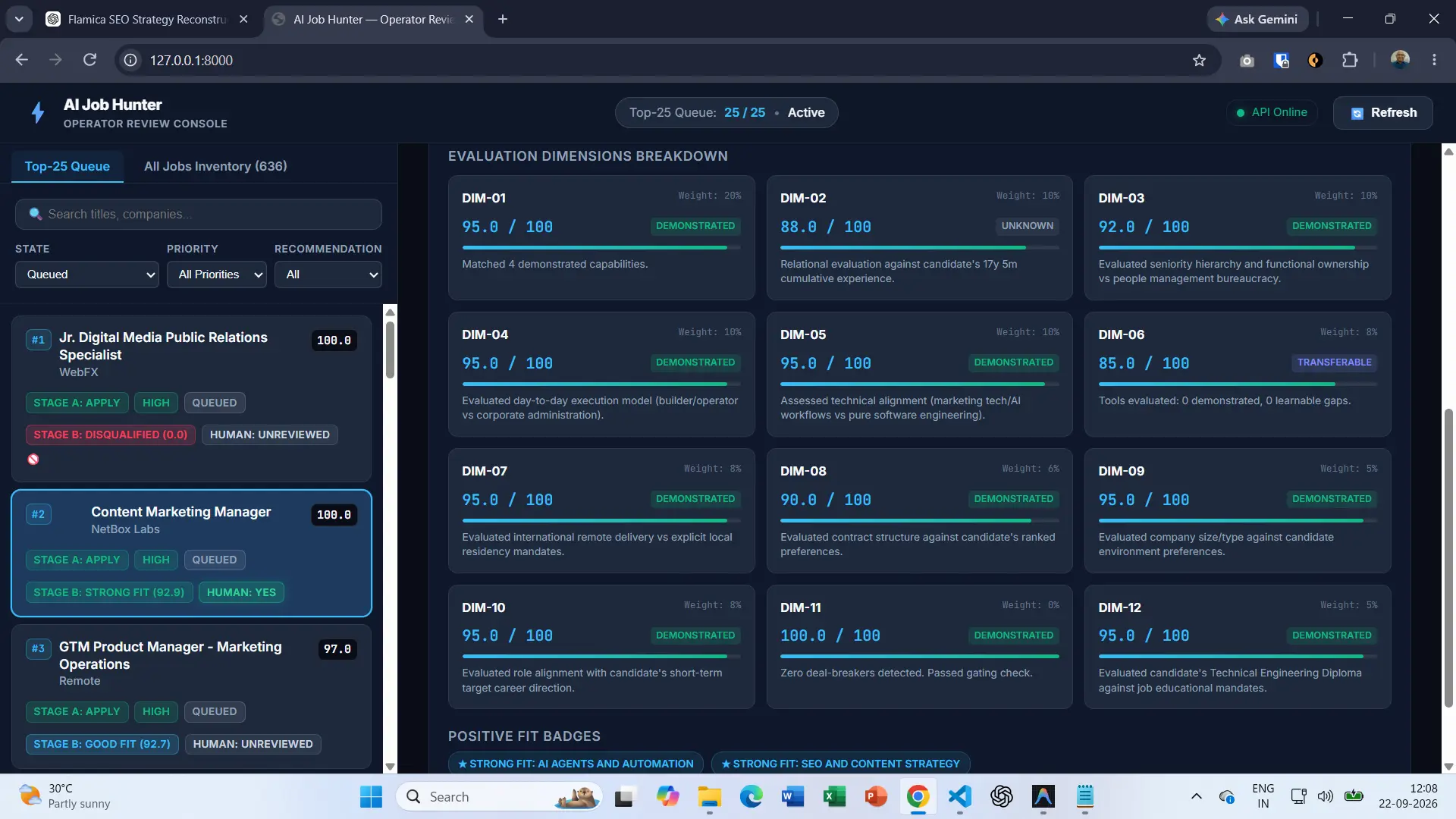
The Stage B screen currently displays twelve evaluation dimensions.
Each dimension has its own score, weight and status such as demonstrated, transferable or unknown. The interface also provides a short explanation of what was evaluated.
For example, the displayed assessment includes dimensions covering demonstrated capabilities, seniority, functional ownership, day-to-day execution, technical alignment, tool familiarity, remote delivery, contract structure, company environment, career direction and educational requirements.
The important design choice is that these dimensions remain visible.
A single score can tell an operator what the result was.
The dimensions help explain why.
Stage B Evaluation Dimension Weights
The current assessment distributes the overall evaluation across twelve dimensions.
The current job assessment illustrates why this level of detail is useful.
Several dimensions are marked DEMONSTRATED. Others are marked TRANSFERABLE or UNKNOWN.
That gives the system a way to distinguish between something directly supported by available evidence and something that requires more interpretation.
For example, the visible assessment includes a dimension with a score of 88.0 marked as unknown, while several other dimensions are marked demonstrated with scores in the 90s.
That is more informative than simply saying:
"This candidate is a 92.9% match."
The score is only the summary. The dimensions provide the context.
Why This Changes the Job Search Process
Traditional job searching often produces a long list of possibilities.
The issue here is that a long list of possibilities may not necessarily offer you useful information.
In this case, much of the work is still manual because an individual has to sort through hundreds of listings, compare requirements, remember their experience and where they fall short of skills before deciding which opportunities are worth pursuing.
AI Job Hunter is being built around a different idea.
The system should reduce the amount of repetitive evaluation required before a person makes a decision.
That does not mean removing the person from the process.
It means giving the person better information before they make the decision.
Stage B is therefore not intended to replace judgment.
It is intended to organize the evidence that supports judgment.
Stage C: Keeping the Human in the Loop
This is where the architecture becomes especially important.
AI Job Hunter does not treat a high suitability score as an automatic instruction to apply for a job.
There is a separate human review step.
This Content Marketing Manager opportunity provides a clear example.
The opportunity is currently shown with:
- Stage A: 100.0 / 100 — APPLY
- Stage B: 92.9 / 100 — STRONG FIT
- Human Review: YES
- Status:
READY_FOR_TAILORING
These are four different pieces of information.
The first two are system assessments.
The third is an explicit human decision.
The fourth indicates what the system is prepared to do next after that decision.
That separation is deliberate.
A recommendation can be generated automatically. A decision to move forward remains under human control.
[SCREENSHOT 835 — OPPORTUNITY DOSSIER / HUMAN REVIEW]
Why the Human Decision Is Separate
A suitability model can only work with the information available to it.
It can identify evidence. It can compare evidence against a candidate profile. It can organize the result into dimensions and produce a recommendation.
But there can still be information that the system does not know.
A person may have a new preference. A company may have changed. A role may have details that were not present in the original posting. The candidate may simply decide that an opportunity is no longer worth pursuing.
Keeping human review as a distinct stage allows those decisions to remain outside the automated scoring process.
That makes the workflow easier to understand and easier to control.
From Human Approval to Tailoring Preparation
Once an opportunity has received explicit human approval, the workflow can move to the next preparation stage.
In the current system, this is represented by the READY_FOR_TAILORING state.
The important word here is preparation.
The system is not being presented as an automatic application bot.
Instead, the approved opportunity can be prepared for the next human-controlled activity, including the information needed to tailor an application to the specific role.
This creates a controlled progression:
- Find the opportunity.
- Preserve the original job information.
- Extract structured evidence.
- Assess relevance.
- Assess suitability.
- Ask for human review.
- Prepare the approved opportunity for tailoring.
That is a very different workflow from simply asking an AI model to "find me a job and apply."
What the System Looks Like Today
The current operator console gives a useful picture of how the project has evolved beyond the first evidence-extraction pipeline.
The system currently exposes an inventory of 636 opportunities and a focused Top-25 queue.
From that inventory, an operator can inspect individual opportunities and move from a high-level queue view into a detailed opportunity dossier.
The dossier brings together the different layers of the system:
- Job relevance
- Candidate suitability
- Blockers and gaps
- Human decision history
- Tailoring preparation
- Original job document
- Extracted evidence
- Adaptive intelligence
- Lifecycle audit information
- Pipeline analytics
This is an important change from the first version of AI Job Hunter.
The first version demonstrated how a job posting could be preserved, analysed and exposed through an API.
The current system is beginning to show what happens when that foundation becomes an actual opportunity intelligence workflow.
The Bigger Idea Behind AI Job Hunter
The project began with a comparatively simple question: given a job posting, how can we get structured data from it?
That foundation is still important.
But the bigger picture is becoming apparent.
An effective AI job search system will, in fact, not go and find more jobs.
It should help reduce the distance between finding an opportunity and understanding whether that opportunity deserves attention.
That requires several layers working together.
The original job document provides the source.
Evidence extraction turns the source into structured information.
Stage A determines whether an opportunity is relevant.
Stage B evaluates candidate suitability.
Stage C puts the final decision back in human hands.
Only after that decision can the workflow move toward preparation for the next step.
That is the direction AI Job Hunter is taking.