
Last updated: September 24, 2026
ChatGPT has changed.
The name has not.
The way you use it has.
From conversational AI to an assortment of performing surfaces: plain Chat, research workflows, Canvas, Work and Codex? There are few remaining tasks, which fit in a normal conversation. Other tools begin to work together when you have ChatGPT work with files or research sources i.e. a local project.
That distinction matters. Because it's not enough to say that ChatGPT can do this or that any longer. Instead, the better question is: which part of ChatGPT actually does the work under what conditions and where do we still need a human at the end?
That is what this review focuses on.
No arbitrary 8.8/10 score.
No single 200-word writing test presented as a benchmark.
No head-to-head winner.
Instead, this page combines current product documentation with Flamica's own controlled testing of Canvas, Deep Research, long-session instruction retention, and Windows desktop/Codex workflows.
Verification note: As with other types of limited product availability – models, limits, and pricing can all change. Always refer to the live OpenAI docs right before purchase or deployment for current plan and model details.
ChatGPT at a Glance
If you only need the short version, start here.
| ChatGPT at a Glance | What ChatGPT Offers | What to Watch |
|---|---|---|
| Everyday Chat | Conversational assistance, writing, analysis, planning | Output still needs verification |
| Web Research | Search and Deep Research workflows | Research depth and usage limits vary by plan |
| Documents | File uploads, analysis, extraction and transformation | Large-file workflows can be affected by context and limits |
| Canvas | Focused editing and code/document work | Not a replacement for every IDE or repository workflow |
| Work | A separate workspace-oriented way to handle longer tasks | Local file access depends on desktop permissions and rollout |
| Codex | Coding-focused workflows with repository and terminal capabilities | Local actions remain subject to OS and permission boundaries |
| Voice | Conversational voice interaction | Usage limits vary by plan |
| Memory | Personalization across conversations | Memory and model-training controls are separate |
| Business | Shared workspace, administration and business privacy controls | Workspace policies and seat types affect access |
The important theme is simple:
ChatGPT is becoming a workflow environment, not just a text box.
What Is ChatGPT Today?
OpenAI ChatGPT is a very versatile AI assistant. Use it to write, plan, summarize files, search the web; play with images; ask technical questions that require code-level expertise; and even process more structured tasks leveraging purpose-built tools and working surfaces.
The interface can make all of this look like one product.
Operationally, it is more useful to think of it as a set of capabilities around a common conversational interface.
This is why the old definition of ChatGPT as simply an "AI chatbot" is increasingly incomplete.
It still chats.
But chatting is only one layer.
The ChatGPT Workflow Model
One way to make the product easier to comprehend is to follow the workflow as opposed to a list of features.
A typical task can move through several stages:
That last box matters.
AI can accelerate the work.
It does not put unnecessary load on us to decide if our content is accurate.
For a blog outline, that could be fact-checks and search intent. For code, this may mean running tests. For research it means making major sources publicly available instead of assuming that a citation made the claim true as an automatic condition. This means making sure permissions are correct, handling data properly, and determining the impact of an action before letting it execute for business workflows.
ChatGPT's Core Capabilities
1. Chat and General Reasoning
The normal Chat experience remains the simplest entry point.
You can ask ChatGPT to:
- explain a technical concept
- rewrite a document
- create an outline
- analyze a business problem
- generate or review code
- brainstorm alternatives
- summarize supplied material
- plan a workflow
- convert information from one format to another
The key innovation here is not the increasing complexity of the user interface.
It is the ability of the same conversational layer to delegate work to different tools and devices.
This makes ChatGPT equally useful for trivial things and complex processes.
But the quality of the output still hinges on the quality of the input context.
A fuzzy prompt will generate a credible response.
A well-specified task with constraints, samples, reference texts, and a clearly defined output format leaves little space for guessing.
A practical prompt pattern
Context:
I am updating a production website for an AI tools directory.

Task:
Rewrite the supplied section for clarity and SEO.

Constraints:
- Keep the factual meaning.
- Do not invent product capabilities.
- Use short paragraphs.
- Preserve Markdown headings.
- Keep internal links.
- Flag any statement that requires current verification.

Output:
Return only the revised Markdown.
That is a much more useful test of an AI assistant than asking it to write a generic 200-word paragraph.
2. Web Search and Deep Research
ChatGPT can browse the web for information.
Deep Research is designed to solve another category of problems, which is multi-steps or detailed questions which involve gathering information from several sources. The latest available documentation at OpenAI states that Deep Research is capable of browsing the public web, uploaded documents, and other integrated applications. OpenAI source
The distinction is useful:
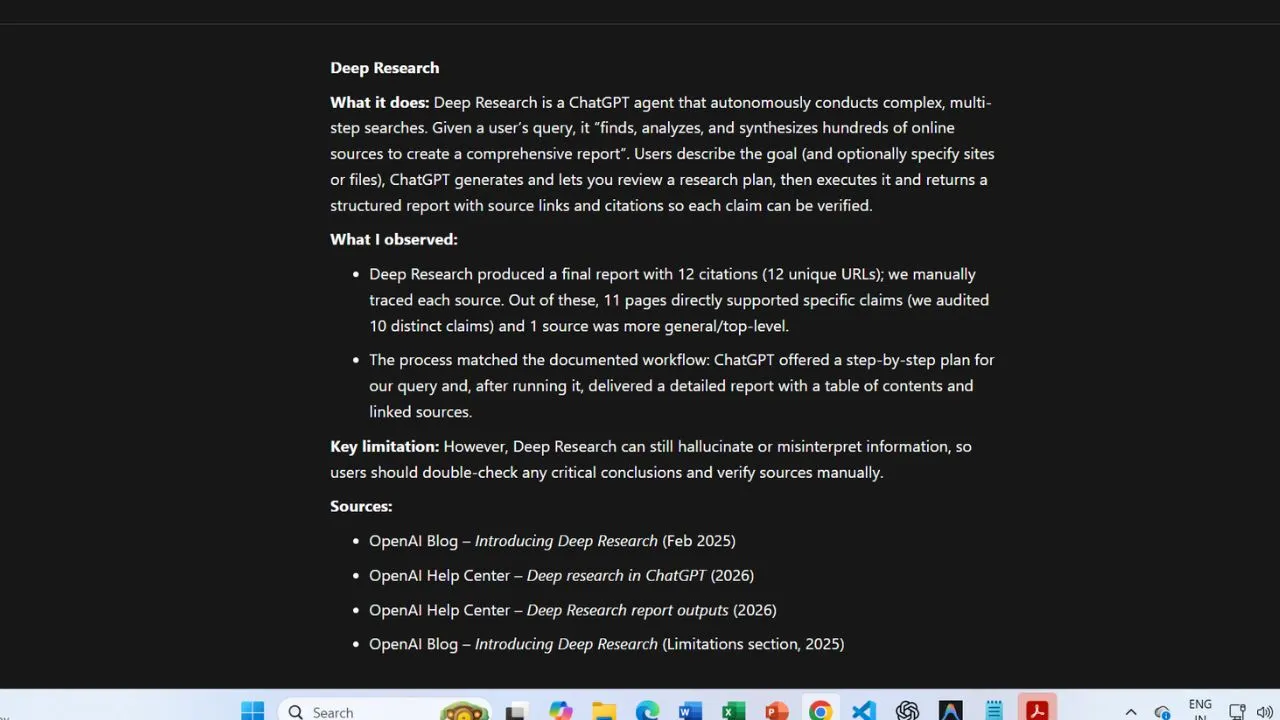
Flamica's Deep Research test
Flamica tested a technical research task focused on ChatGPT Work and Codex.
The documented test produced:
- 12 distinct factual assertions
- 10 major claims selected for detailed audit
- 12 citation URLs checked
- 11 citations resolving directly to relevant supporting documentation
- 1 citation resolving to a generic top-level security page
- 0 broken URLs
That is useful evidence.
It is not proof that every Deep Research task will produce perfect citations.
In fact, the generic security-page result demonstrates exactly why citation inspection still matters.
A live URL is not automatically a precise source.
3. Canvas
Canvas is designed for focused editing and creation work where the document or code needs to be manipulated as an object rather than treated as a long chat response.
This is particularly useful for:
- code refactoring
- structured documents
- iterative editing
- preserving a working version while experimenting
- inspecting changes visually
- rolling back to an earlier version
Flamica's Canvas test
The test used a synthetic 157-line JavaScript module.
The instructions included a protected function marked:
// DO_NOT_CHANGE
function generateAuditHash(input) {
  return createHash(input);
}
This included maintaining public function signatures, implementing better error handling, eliminating duplicate code, and ensuring that no external dependencies were added.
Across three documented iterations on the target file, the test observed:
- redundant logic being consolidated
- repeated conditionals being replaced with a lookup structure
- guard clauses being added
- the protected function remaining byte-for-byte unchanged
- visual inline diffs
- version restoration
- successful
node --checkvalidation - no added npm dependencies
And that is definitely a more relevant experience than any written assessment scores.
However, there is an important distinction to make.
The test used a multi-file project fixture, while Canvas editing itself
was performed directly on main.js.
So this review does not claim that Canvas performed simultaneous cross-file repository refactoring.
That distinction is small.
But it is exactly the kind of distinction a trustworthy product review should preserve.
Work, Desktop Access, and Codex
This is where the modern ChatGPT product becomes considerably more interesting.
OpenAI now documents separate Chat, Work, and Codex experiences. On desktop, Work can access local folders when you grant permission, while Codex remains a separate view with its own workflow and history. Local Work access is specifically tied to the desktop application. OpenAI source 1 / OpenAI source 2
The practical architecture looks more like this:
The key word here is permission.
AI-assisted computer work is not the same thing as unrestricted computer control.
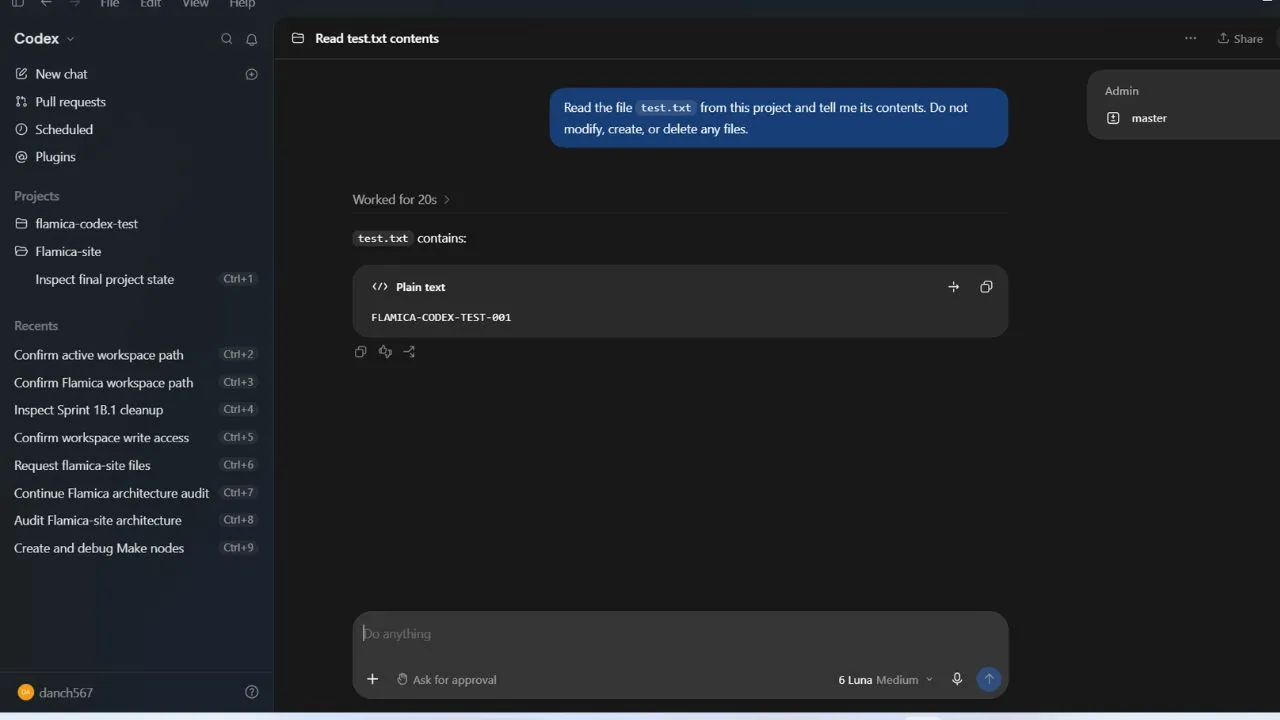
Flamica's Windows test
The documented first-hand test used synthetic files on Windows 10/11 x64.
The observed workflow included:
- folder access triggering an OS permission dialog
- successful discovery of the test files after approval
- exact reading of a synthetic test file
- a confirmation step before creating a new file
- terminal command preview
- PowerShell execution being blocked by the host's default policy
- explicit authorization before using
-ExecutionPolicy Bypass - a high-friction warning before a destructive deletion
- the deletion being blocked
The locked-session test also showed that the Windows environment did not bypass the OS-level interactive authorization boundary.
That finding is deliberately narrow.
macOS and Linux were not tested in this evaluation.
So this article does not turn a Windows observation into a universal desktop claim.
ChatGPT Models: Why a Static List Is a Bad Review Strategy
One of the easiest ways to make an AI tool page obsolete is to publish a hard-coded model list and leave it there.
Model availability changes.
Plan access changes.
Models are retired.
New models appear.
Some capabilities are available only on particular surfaces.
So rather than treating ChatGPT as:
ChatGPT = Model X
it is more accurate to think:
ChatGPT
│
├── Plan
│
├── Surface
│   ├── Chat
│   ├── Work
│   └── Codex
│
├── Model access
│
├── Tools
│
└── Usage limits
The documentation from OpenAI regarding its Plus service specifically states that models may change during rollout periods and recommends using the model picker for up-to-date information. OpenAI source
That makes the model picker and live plan documentation more durable sources than a static model inventory in a review article.
Last verified: September 24, 2026.
ChatGPT Pricing and Plans
Pricing is one of the sections that ages fastest.
The safest approach is therefore to show the current structure without pretending that usage limits are permanent.
| Plan | Current Published Price / Status | Practical Role |
|---|---|---|
| Free | $0 | Core ChatGPT with basic limits |
| Go | $8/month in the US; localized pricing in some markets | More access to popular tools and higher limits |
| Plus | $20/month | Broader model and tool access |
| Pro $100 | $100/month | Higher-usage professional tier |
| Pro $200 | Existing subscribers retain access; new sign-ups/upgrades currently paused | Highest-usage Pro tier |
| Business Standard | $20/user/month annual or $25 monthly | Team workspace |
| Business Premium | $100/user/month annual or $125 monthly | Higher-usage team seat |
OpenAI's Go documentation describes expanded access to image generation, file uploads, data analysis, memory, projects, tasks, custom GPTs, and Library, while noting that some advanced features require Plus or higher. OpenAI source
Plus is currently $20/month and provides broader model and tool access than Free, with current availability dependent on the model picker and rollout status. OpenAI source
The Pro situation needs special care. OpenAI says new sign-ups and upgrades to the $200 Pro plan are temporarily paused as of September 10, 2026, while existing $200 subscribers and $100 Pro subscriptions are unaffected. OpenAI source
Business currently has Standard and Premium seats, requires at least two paid seats, and uses different monthly versus annual pricing. OpenAI source
Why I would not publish hard Deep Research quotas here
Usage limits change.
OpenAI explicitly says Deep Research usage varies by plan and that the in-product counter shows remaining tasks. OpenAI source
So instead of publishing a number that may be obsolete next month:
Check the usage counter and current plan documentation before relying on a fixed quota.
A Better Way to Think About Plan Selection
Don't start with the price.
Start with the workload.
This is not a ranking.
It is simply a way to match a plan to a workload.
Privacy, Training, and Memory
This is one of the sections where oversimplification can create real problems.
There are several separate concepts:
- chat history
- model improvement
- memory
- temporary chat
- workspace controls
- file retention
- connected-app permissions
They are not interchangeable.
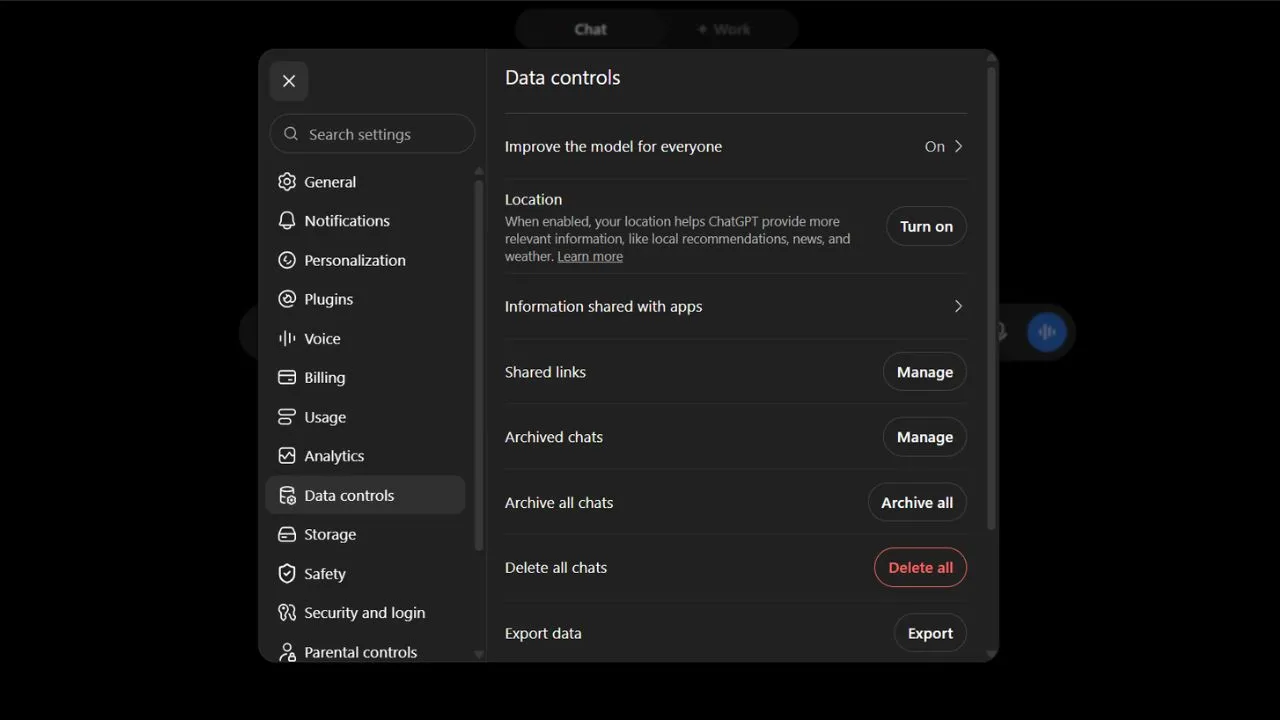
Those who qualify for personal accounts have an "Improve the model for everyone" control offered by OpenAI. When turned off, this will prevent the conversations from being used for the training of models; however, it will not delete the conversations. OpenAI source 1 / OpenAI source 2
Temporary Chat is different.
Temporary chats do not appear in history, do not create or update memories, and are not used to improve OpenAI models while temporary. OpenAI may retain a copy for up to 30 days for safety purposes. OpenAI source 1 / OpenAI source 2
Memory is another layer again.
OpenAI describes memory and model-training controls as separate settings. OpenAI source 1 / OpenAI source 2
For Business, OpenAI says workspace data is not used to train its models by default and is encrypted in transit and at rest. OpenAI source
That gives us a much cleaner mental model:
The key takeaway is straightforward:
Don’t think about "privacy" as a single switch.
For when you’re implementing ChatGPT in your business processes, check out the particular privacy configurations for that use case.
Strengths and Practical Limitations
Instead of giving a grade, here’s what the data says.
Documented and observed strengths
Fast transformation of information
ChatGPT is particularly useful when the input already exists and needs to be transformed:
Raw notes
   ↓
Structured outline
   ↓
Draft
   ↓
Rewrite
   ↓
Summary
   ↓
Action list
Broad workflow coverage
The product can transition from conversation to research, filing, data analysis, Canvas, Work, and coding.
It is due to that versatility that the product can exist within multiple workflows.
Strong constraint handling in the tested Canvas workflow
The protected function remained unchanged during the documented Canvas test.
That does not prove perfect instruction adherence.
It does show that, under the tested conditions, a negative constraint could be preserved through multiple editing iterations.
Useful research workflow
The Deep Research test produced live citations without broken URLs.
One citation was generic rather than precise.
That is exactly why human source verification remains part of the workflow.
Permission-aware desktop behavior
The Windows test showed explicit authorization boundaries around local folders, files, terminal execution, and destructive operations.
That is more useful information than saying "Codex can control your computer."
Practical Limitations
The limitations are equally important.
AI output can still be wrong
A polished answer is not evidence that the underlying claim is correct.
This matters especially for:
- current pricing
- product capabilities
- legal or compliance questions
- technical specifications
- medical information
- financial decisions
- rapidly changing news
Product behavior changes
Models, limits, interfaces, and rollout availability change.
A test performed on September 24, 2026 is a record of that environment.
It is not a guarantee of future behavior.
Desktop testing is environment-dependent
The Flamica desktop test was Windows-only.
Different operating systems, permissions, security policies, and rollout states can produce different results.
Context retention is not infinite memory
Flamica's controlled test retained six constraints through 30 turns.
That does not establish a maximum context window.
It does not prove reliable retention through massive repositories or very large document ingestion.
Canvas is not a complete IDE
The tested workflow demonstrates focused editing.
It does not establish full repository indexing, simultaneous multi-file editing, terminal debugging, or complete IDE replacement.
Flamica's First-Hand Testing Methodology
This review deliberately separates product documentation from direct observation.
That distinction is important.
Test matrix
| Test | Environment | Result | Boundary |
|---|---|---|---|
| Canvas Refactoring | Synthetic JS fixture | Test condition met | Single primary file |
| Deep Research | Technical product investigation | Test condition met | One documented research run |
| Long-Session Context | 30 conversational turns | Test condition met | Six predefined constraints |
| Desktop / Codex | Windows 10/11 x64 | Test condition met | Windows only |
The purpose was not to produce a leaderboard.
It was to answer practical questions:
What actually happened?
Can we reproduce the observation?
What does the evidence not prove?
That is a much more useful standard for a tool page.
A Practical ChatGPT Workflow for a Business
Here is where ChatGPT becomes more than a writing assistant.
Imagine a business receives a messy collection of customer feedback.
A useful workflow could look like this:
Notice what is missing.
"Let AI send everything automatically."
The human approval stage is deliberate.
In more risky processes, the boundary for the approval stage needs to be clear.
Code Example: Making AI Output a Controlled Process
One way to do this is by making sure that structured output is produced instead of free-form text.
For example:
{
  "intent": "support_request",
  "priority": "medium",
  "customer_issue": "Unable to export report",
  "recommended_action": "Provide export troubleshooting steps",
  "needs_human_review": true
}
That structure can then feed another system.
For example:
if result["needs_human_review"]:
    send_to_human_queue(result)
else:
    continue_workflow(result)
This is the difference between:
using ChatGPT
and
building a workflow around ChatGPT.
The second approach requires clearer boundaries.
Who ChatGPT Fits
ChatGPT can be useful for:
Writers and marketers
For drafting, rewriting, content planning, research, and campaign ideation.
Developers
For code explanation, debugging, refactoring, documentation, and coding workflows.
Researchers
For source discovery, synthesis, document analysis, and multi-step research.
Business teams
For internal analysis, document workflows, knowledge work, and structured task assistance.
Solo operators
For turning one-person workflows into repeatable processes.
That last category is especially interesting.
A solo business can use ChatGPT as a working layer across:
Research
   ↓
Planning
   ↓
Content
   ↓
Analysis
   ↓
Automation
   ↓
Documentation
The important part is not asking ChatGPT to do everything.
It is deciding where AI actually reduces manual work.
Who Should Be More Careful
ChatGPT needs more oversight when:
- the cost of an error is high
- the source material is confidential
- the workflow can modify production systems
- the output will be published without review
- the task involves legal, financial, medical, or compliance decisions
- current information is critical
- an AI-generated action can cause irreversible changes
In those situations, the workflow should include explicit verification and approval steps.
ChatGPT vs Claude vs Gemini
This page is intentionally not a head-to-head comparison.
That belongs on Flamica's comparison pages.
If you want to compare how the tools behave on the same tasks, use:
The difference is architectural.
This page answers:
What is ChatGPT, what can it do, how does it work, what does it cost, and what did Flamica observe when testing it?
A comparison page answers:
How did multiple tools perform when tested against the same task?
Keeping those questions separate makes both pages more useful.
Frequently Asked Questions
Is ChatGPT free?
Yes. ChatGPT has a Free plan. OpenAI also offers paid plans with expanded access and higher limits. Go is currently available globally, with US pricing of $8/month and localized pricing in some markets. OpenAI source
How much is ChatGPT Plus?
ChatGPT Plus is currently $20/month. OpenAI notes that model availability and limits can change over time. OpenAI source
Is ChatGPT Pro still $200?
The $200 Pro option still exists for eligible existing subscribers, but OpenAI says new sign-ups and upgrades to the $200 plan are temporarily paused as of September 10, 2026. The $100 Pro plan remains available. OpenAI source
Does ChatGPT have Deep Research?
Yes. Deep Research is designed for multi-step, in-depth research and can use the public web, uploaded files, and supported connected apps. Usage varies by plan. OpenAI source
Can ChatGPT work with files on my computer?
On desktop, OpenAI documents local folder access for Work when you grant the required permission. Web and mobile Work cannot directly access files on your computer. OpenAI source
Can Codex run commands on my computer?
Codex can work with local development environments, but actual execution is subject to the permissions and security controls of the environment. In Flamica's Windows test, terminal execution required explicit authorization and was constrained by Windows PowerShell policy.
Does ChatGPT remember previous conversations?
ChatGPT has memory and personalization features, but memory, chat history, and model-training controls are separate concepts. Availability depends on the account and settings. OpenAI source 1 / OpenAI source 2
Can I stop my chats from being used to improve models?
Eligible personal accounts can turn off Improve the model for everyone in Data Controls. Turning it off prevents new conversations from being used for training but does not delete saved chats. OpenAI source 1 / OpenAI source 2
Is Temporary Chat private?
Temporary Chat does not appear in chat history, does not create or update memories, and is not used to improve OpenAI models while temporary. OpenAI may retain a copy for up to 30 days for safety purposes. OpenAI source 1 / OpenAI source 2
Is ChatGPT Business different from a personal ChatGPT account?
Yes. Business provides a collaborative workspace with administration and business data protections. OpenAI says Business workspace data is not used to train its models by default. Business currently has Standard and Premium seat types and requires at least two paid seats. OpenAI source
Can ChatGPT replace a developer or writer?
It can automate parts of a developer or writer's workflow.
That is different from replacing the role.
The useful question is not whether AI can generate the work.
It is whether the generated work is accurate, maintainable, appropriate, and ready to ship.
Final Assessment
ChatGPT is no longer well described by a single feature list.
It is better understood as a collection of AI-assisted work surfaces connected through a common interface.
You can chat.
You can research.
You can work with documents.
You can edit in Canvas.
You can use Work for longer workflows.
You can use Codex for coding-oriented tasks.
You can connect tools and data.
And you can build repeatable processes around all of it.
But there is a second half to that story.
The more capable the workflow becomes, the more important boundaries become.
Permissions.
Source verification.
Human review.
Data controls.
Testing.
That is why the most useful way to evaluate ChatGPT is not:
"How intelligent is it?"
It is:
"What work can it reliably handle, under what conditions, and where should a human remain in the loop?"
That is the question this review is designed to help you answer.
Last verified: September 24, 2026.
Source Verification
Current product and policy statements in this article were checked against OpenAI documentation on September 24, 2026, including:
- ChatGPT FAQ and current product behavior
- ChatGPT Go
- ChatGPT Plus and Pro
- ChatGPT Work and Codex
- Deep Research
- Data Controls
- Temporary Chat and retention
- ChatGPT Business
- Ads in ChatGPT
- OpenAI Business pricing
- Current GPT-5.6 and GPT-6 Pro availability
Structured-data decisions should be validated separately against current Google Search Central documentation before deployment. See the SoftwareApplication structured data documentation and the Review snippet documentation. Structured data does not guarantee that a particular rich result will appear.