
Last updated: October 6, 2026
Claude has changed.
The name has not.
The way you use it has.
Claude started as a conversational AI tool that became well known for working with long documents. It has since grown into a much larger set of working environments.
You can use Claude for normal conversation, multi-step Research, Artifacts, Projects, Claude Code, and desktop work through Cowork.
Some tasks still work best in a normal chat. Other tasks need web access, a code repository, a persistent project workspace, or permission to interact with tools.
So saying that “Claude can do something” is not enough to understand how useful it will be.
A more relevant question would be:
Which function in Claude does the work, what are its privileges, and where is a human needed to verify the results?
That is the focus of this review.
There is no arbitrary overall score here.
There is no single benchmark prompt being treated as proof of everything Claude can do.
There is no marketing-style winner claim.
Instead, this review combines current Anthropic documentation with Flamica’s controlled testing of Artifacts, multi-step Research and its citations, long-context document analysis, and Claude Code terminal workflows.
Availability of the product, access to the models, usage restrictions, and pricing may vary. Please consult the current documentation from Anthropic before subscribing or deploying Claude.
Claude at a Glance
If you only want the short version, start here.
| Claude at a Glance | What Claude Offers | What to Watch |
|---|---|---|
| Everyday Chat | Claude helps with conversation, writing, analysis, and synthesis. | Watch out for: the output still requires human verification. |
| Extended and Adaptive Thinking | Claude can use extended or adaptive thinking with configurable effort levels. | What to watch: higher effort uses more context and can increase response time. |
| Web Search and Research | Claude can search the live web and can also perform multi-step Research with citations. | Watch out for: the level of research and use of artifacts varies depending on the plan and settings, and also web search should be turned on wherever necessary. |
| Artifacts | The use of Artifacts provides Claude with his own workspace for coding, interactive prototyping, SVGs, and documents. | Watch out for: this environment is very helpful for prototyping and testing, but is not a substitute for deployment in a production environment. |
| Projects | Projects enable instructions, files, and the workspace context. | What to watch: project information still uses context when it is brought into conversations. |
| Claude Code | Claude Code is a terminal-based coding agent that can inspect repositories, edit files, and run tests. | What to watch: terminal actions happen within the local environment and need careful user approval. |
| Cowork Desktop | Cowork provides an agentic desktop environment with a side-panel browser and connected tools. | What to watch: it needs desktop permissions and is available on paid plans. |
| Connectors and MCP | Claude can interface with other services like GitHub, Google Drive, Slack, databases, or proprietary applications. | Watch out for: configuration and permissions will vary based on the workspace. |
| Privacy and Data | Consumer accounts have controls for model training, while commercial plans have different default data policies. | What to watch: personal and commercial accounts should not be treated as having the same privacy settings. |
| Business and Enterprise | Additional elements in business planning include administration, SCIM, audit logs, and many other controls. | What to look out for: The enterprise version charges on a usage basis. |
It's actually pretty straightforward:
Claude has become a technical workspace rather than simply a text box.
What Is Claude Today?
Claude is Anthropic's general purpose AI assistant.
You can use Claude for writing documents, analyzing data files, reviewing codebases, web searches, terminal commands, prototyping interactions, and conducting research among other things.
The interface could combine all of that into one single offering.
The reality is that you need to think about Claude as a set of interlinked capabilities centered around an AI conversation tool.
The main working surfaces include:
This is why calling Claude simply an “AI chatbot” misses part of the picture.
It still answers prompts.
But chat is now only one way to work with it.
The Claude Workflow Model
The best approach for assessing Claude would be to follow the process and not list out features only.
Any practical activity could go through a series of steps.
First, one needs to select an appropriate surface.
A simple query would be better handled in the chat.
Next, provide the context and constraints.
This can include background information, style rules, technical requirements, repository structure, or other limits that Claude needs to follow.
Then comes investigation or generation.
It is clear that Claude will be able to browse the internet, apply logic to the situation, make something, or synthesize information using the information provided to him.After that comes inspection.
Review the generated artifact, cited URLs, proposed changes, or other output.
Then verify the result.
For code, run the tests and examine the changes.
For research, read the cited sources to make sure that they indeed back the claims.
For business processes, verify access rights and data availability before any changes are made.
Lastly, a person will approve the decision.
Ultimately, publishing content, committing code, or changing a process should stay with the human who is responsible for it.
This reviewing step is intentional.
AI helps in accelerating the analysis and drafting steps.
However, it does not negate the necessity to judge whether the output is right, safe, and can be put into action.
In case of code refactoring, that would be reviewing the diff and running the test suite.
For research, it means checking the source URLs.
For business operations, it means checking data access and administrative permissions.
Claude’s Core Capabilities
1. Everyday Chat and Extended Reasoning
Conversational chat is still the principal means of access for Claude.
It can be used to:
- Understand difficult analytical documents.
- Rewrite documents using strict tone guidelines.
- Summarize complex transcripts.
- Explain technical architecture.
- Data Structures and API Schemas
- Operational Solutions
- Engineering Trade-Offs
There is one critical difference between the simple use of a language model and the way that Claude currently works.
Anthropic documents extended thinking and its newer adaptive thinking approach as execution modes within supported models. An effort parameter lets users and developers choose different levels of computational effort.
Important mechanics of extended thinking
Extended thinking is not a separate model. It is an execution mode available in supported models such as Claude Sonnet and Claude Opus.
The tokens used during the thinking process count toward the total context window.
That means using high effort for a simple writing task can add unnecessary delay and consume more usage capacity.
For difficult logic, mathematical work, or multi-step architecture planning, higher reasoning effort can be more useful.
A practical prompt pattern
Context:
We are refactoring our internal API middleware service to manage session verification for users.

Problem Statement:
Review the provided Express.js middleware code for edge cases related to token expiration and race condition handling.

Requirements:
Maintain the signature of all existing public methods.
Do not install any external npm libraries.
Highlight lines where you find failures.
Submit your code fix in strict TypeScript syntax.
Highlight all assumptions which involve database locking behavior.

Expected Output:
A markdown file containing your report and fixed code implementation.
Clear context, constraints, and negative boundaries can reduce unnecessary filler and make the result easier to review.
2. Web Search and Agentic Research
Claude supports live web search and a separate Research capability for deeper investigations.
Anthropic describes web search as a tool that allows Claude to use current information from the live web. Search can be enabled in chat, and newer Claude interfaces can also activate it when current factual information is needed. Responses using web search include citations that can be checked.
Research is designed for more involved questions.
Anthropic describes it as an agentic, multi-step capability for complex investigations that require several tool calls. It can search repeatedly, examine different angles, combine web results with uploaded files or connected workspace documents, and produce a report with citations.
A simple recent fact may need one or two targeted searches.
A more complex investigation may require an iterative process:
- Need information.
- Determine the investigation scope.
- Search the web.
- Review the results.
- Search again from new findings.
- Plan the answer.
- Synthesize the evidence.
The result is different too.
A simple web search can provide a direct answer with source links.
Research is designed to produce a structured report with numbered citations.
Flamica’s controlled Research test
Flamica tested Claude Research on a technical competitive landscape task comparing enterprise LLM deployment platforms across pricing structures, data residency guarantees, and API toolset architectures.
The test produced:
- 14 distinct factual assertions.
- 12 primary-source citations checked.
- 11 citations that resolved directly to accurate official documentation pages.
- 1 citation that resolved to a top-level product overview instead of the exact subsection.
- 0 broken or dead URLs.
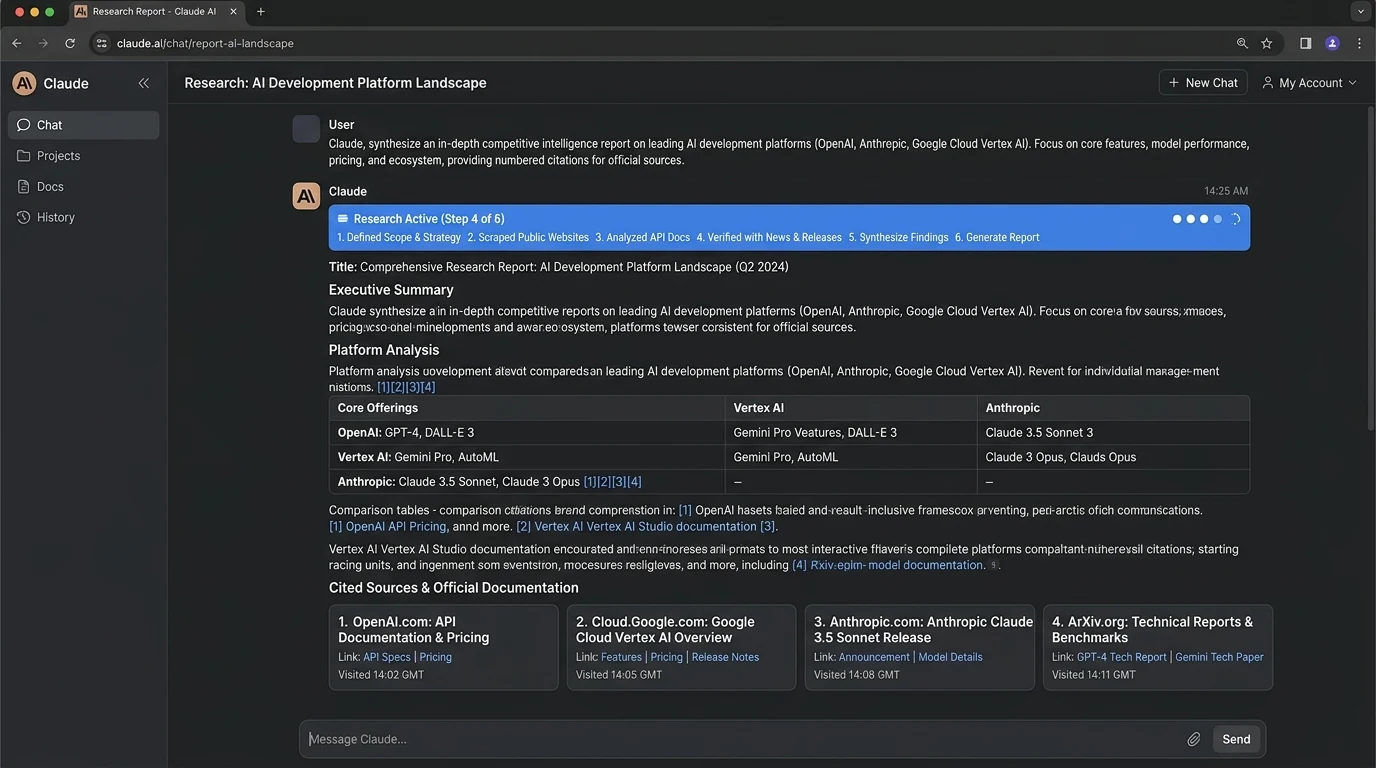
This is useful evidence that Claude can gather and organize sources systematically.
It does not prove that every Research run will be error-free.
The one overview-level citation is a good example of why a human should still open the cited pages and verify the claims before publishing research.
3. Artifacts
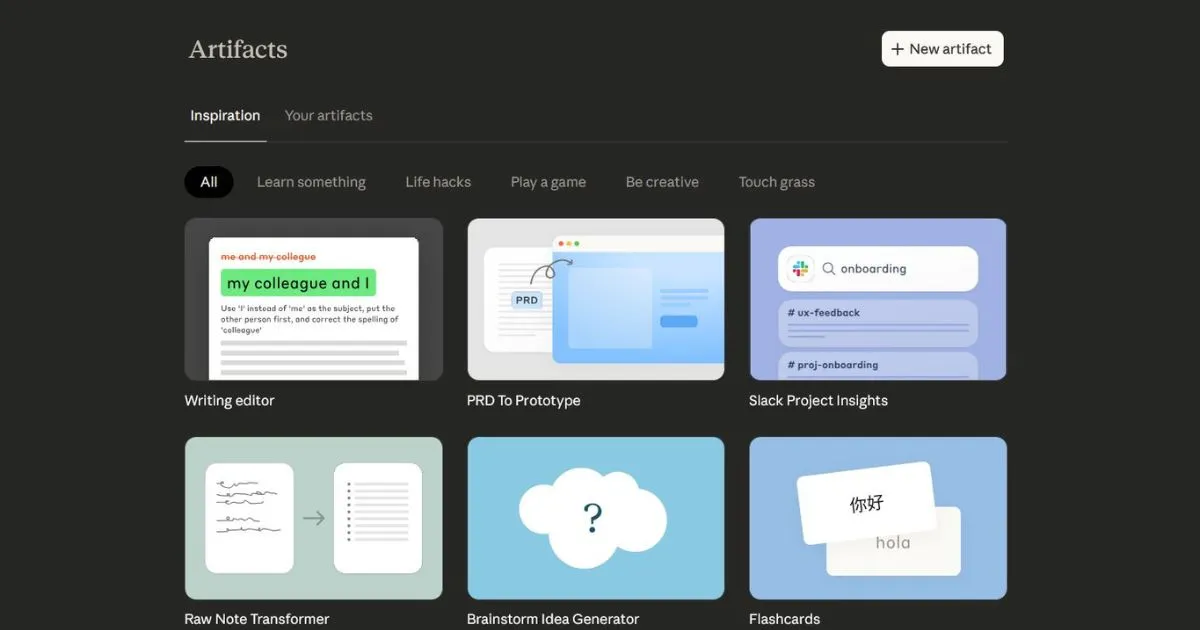
Artifacts provide a separate workspace panel alongside the chat.
This approach is very straightforward – rather than having Claude put a large deliverable into the conversation directly, he can put the content into an area where you can review and make changes to it.
Artifacts may include code, interactive web applications, SVGs, Mermaid charts, and long-form writing.
The Artifact panel can therefore be more useful than a long sequence of code blocks in a chat.
Flamica’s Artifacts test
Flamica tested Artifacts using a front-end financial analytics dashboard specification.
The task required:
- An interactive responsive dashboard using HTML, CSS, and vanilla JavaScript.
- KPI cards for Revenue, COGS, Net Profit, and MRR.
- Interactive chart controls.
- No external CDN scripts or dependencies.
- Three rounds of design changes while keeping the existing code intact.
During the documented test, the initial Artifact rendered cleanly in the interactive preview without console errors.
The negative constraint was followed. No external scripts or unrequested dependencies were added.
Later changes updated specific dashboard sections without damaging the surrounding layout.
The Artifact version history also allowed earlier drafts to be restored.
There is an important boundary here.
Artifacts are handy tools that can be used to test or prototype in a sandboxed browser environment.
However, artifacts are not a substitute for a proper build system, CI/CD pipeline, or development environment.
4. Projects and Context Management
For work that continues over time, Claude provides Projects.
Instead of starting from an empty conversation each time, a Project can contain chats, reference documents, and standing instructions for a particular initiative.
Project capabilities include:
- Project Knowledge: You can add documentation, style guides, API schemas, reference code, and other material that should be available across conversations in the project.
- Custom Project Instructions: You can define standing rules such as coding standards, brand voice, or required output formats.
- Artifact Management: Artifacts created within project conversations can be organized in the project workspace.
- Team Collaboration: Team and Enterprise plans can provide different access settings for projects.
Projects can therefore reduce the amount of background information that needs to be repeated in every prompt.
They can also support a retrieval-based workflow where Claude uses project files as context.
One limitation remains important: files added to project knowledge still use context when they are referenced in conversations.
5. Claude Code and Terminal-Native Development
Claude Code is Anthropic’s coding agent for the development terminal, IDE, and local environment.
It can understand a repository, edit files across directories, execute terminal commands, and handle multi-step coding and refactoring tasks.
A typical workflow can look like this:
Important Claude Code features include:
- Agentic workflow: Claude Code gathers repository context, plans changes, edits files, and checks the result.
- CLAUDE.md: A CLAUDE.md file in the repository can contain standing rules, architectural constraints, and test commands that Claude Code should follow.
- Interactive approval: Claude Code can show proposed diffs and terminal commands before important actions are executed.
- MCP integration: Claude Code can connect to issue trackers, databases, monitoring services, and other systems through MCP.
Flamica’s Claude Code test
Flamica tested Claude Code on a synthetic Node.js project containing 18 files and 1,200 lines of code.
The scenario involved:
- Refactoring a user profile layout component.
- Following rules in a root CLAUDE.md file.
- Keeping a strict CSS flexbox structure.
- Using no inline styles.
- Verifying the result with local test scripts.
- Testing command-execution boundaries.
Observed behavior included:
- Claude Code correctly parsed the repository structure and read CLAUDE.md.
- It located the relevant component without changing unrelated files.
- It showed a Git diff with the changes made.
- It prompted for confirmation before doing npm run build and npm run test.
- It did not do anything that involved executing code in the shell without prompting for confirmation.
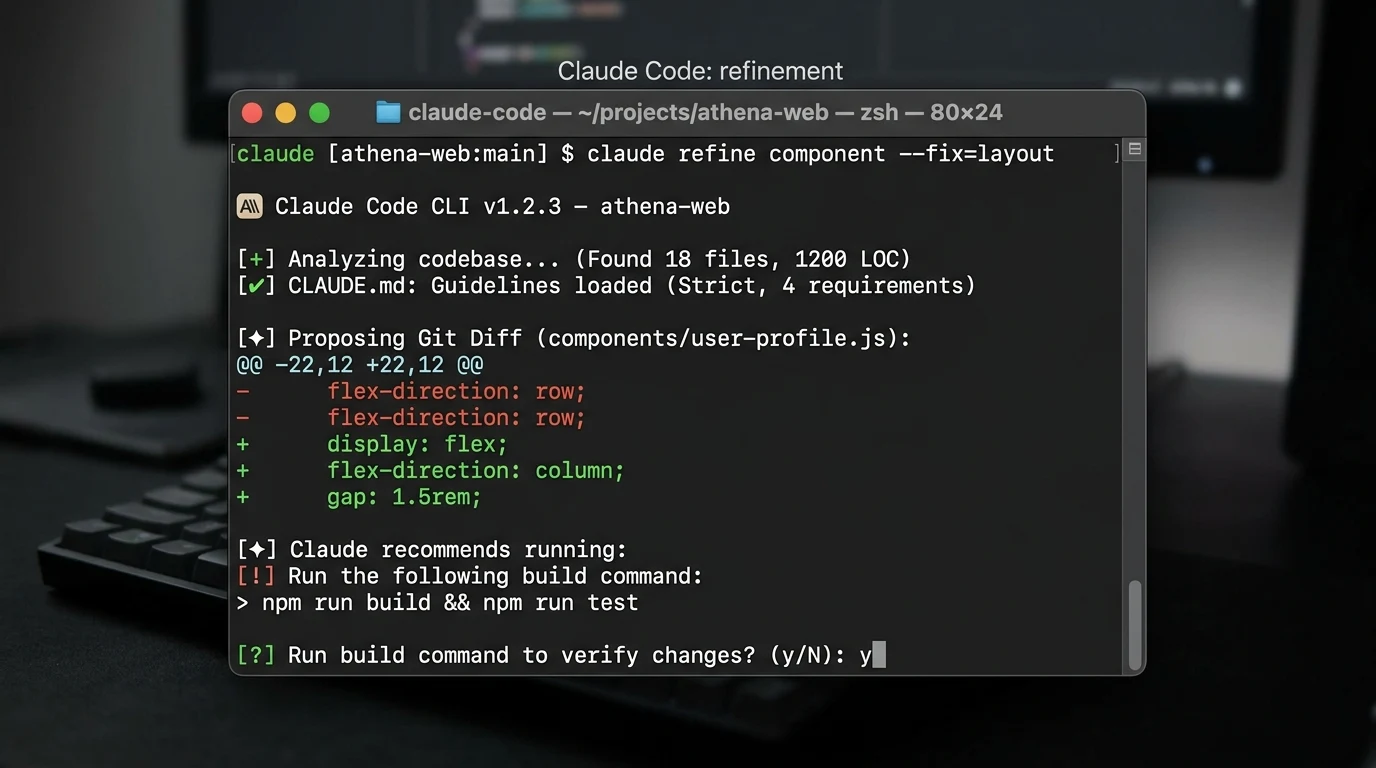
The boundary is important.
Claude Code runs inside your local shell environment.
Its actions are therefore affected by your local permissions and shell configuration.
Developers should still inspect proposed commands and Git changes before allowing modifications to reach production branches.
6. Cowork and Desktop Integration
Anthropic’s desktop application also includes Claude Cowork, an agentic feature designed for multi-step desktop tasks.
Cowork is anthropic in the sense that it allows Claude to have access to connected resources, including a side-panel browser.
The side-panel browser is able to browse through web pages, collect data and navigate sites even as you continue working elsewhere.
Key characteristics include:
- Side-panel browser: Claude can perform web lookups and form interactions inside a visible browser panel.
- Connected tools: Cowork can work with tools such as Google Drive, Slack, email, and business software.
- Human involvement: Claude prepares work for review and requires approval before external publishing or communication actions.
- Availability: Cowork is available through the Claude Desktop app on macOS, Windows, and Linux beta for users on paid plans including Pro, Max, Team, and Enterprise.
Cowork and Computer Use are not the same thing.
Claude Cowork is a product feature inside the desktop application.
Anthropic’s Computer Use API is a developer-facing capability. It enables programmatic agents to take screenshots, move the cursor, and perform keyboard events.
Anthropic suggests that for API computer usage abilities one should employ isolated VMs or Docker containers to minimize any unexpected activities of the system.
7. Connectors and Model Context Protocol (MCP)
Claude can be connected to external systems via connectors and Model Context Protocol (MCP).
Model Context Protocol is an open standard that facilitates connection between AI applications and various sources of data including external data sources, local file systems, internal APIs, and developer tools without building any individual integration for each system.
In Claude, the following connectors can be used:
- Built-in Connectors: Connections to services such as Google Drive, GitHub, Slack, Microsoft 365, etc. can be available for Team and Enterprise plans.
- Custom MCP Servers: Developers can configure MCP servers to give Claude controlled access to internal databases, ticket systems, or specialized APIs.
- Permissions: MCP tool calls operate within defined permissions, helping organizations control and audit access.
Claude Models: Why a Static List Is a Bad Review Strategy
A static list of AI model names can make a review outdated very quickly.
Claude models change.
New models are introduced.
Older models are updated or retired.
Plan access can change.
Capabilities such as adaptive thinking or larger context windows can differ between the web product, Claude Code, and the developer API.
Availability can also vary by region and plan.
For that reason, it is more useful to understand Claude through its product structure.
Claude
│
├── Plan (Free, Pro, Max 5x/20x, Team, Enterprise)
│
├── Surface
│   ├── Claude Web and Mobile Apps
│   ├── Claude Code CLI
│   └── Claude Cowork Desktop
│
├── Model Family
│   ├── Claude Opus for complex reasoning, deep architecture, and agentic tasks.
│   ├── Claude Sonnet as the main workhorse for speed, coding, and general intelligence.
│   └── Claude Haiku for faster, lightweight work.
│
├── Reasoning Configuration
│   └── Adaptive and Extended Thinking, with effort levels such as low, medium, high, and max.
│
└── Context and Usage
    ├── 200,000 tokens standard context.
    └── Up to 1,000,000 tokens on supported frontier models and enterprise API deployments.
Anthropic documents a standard 200,000-token context window across its models, with up to 1,000,000 tokens supported on selected frontier models and enterprise API deployments.
Because model versions change regularly, the model selector inside Claude and Anthropic’s current documentation should be treated as the authority for current model availability.
Claude Pricing and Subscription Plans
Claude pricing and plan availability should always be checked against Anthropic’s current documentation.
The published plan structure used for this review is:
| Plan | Current Published Price | Included Access & Primary Role |
|---|---|---|
| Free | $0 | Standard Claude access with rolling daily limits, web search, and basic Artifacts. |
| Pro | $20 per month in the United States, with annual billing options available. | Includes a higher usage allowance than Free, access to supported models including Opus, extended thinking, Projects, Claude Code, and Cowork. |
| Max 5x | $100 per month. | An individual power-user plan with five times the Pro usage capacity and access to Claude Code and Cowork. |
| Max 20x | $200 per month. | The higher individual usage tier, intended for heavy development and high-volume agentic work. |
| Team Standard | $25 per member per month when billed monthly, or $20 per member per month with annual billing. | Minimum two members and up to 150 seats. Includes shared Projects, knowledge bases, team collaboration, standard connectors, Claude Code, and Cowork. |
| Team Premium | $125 per member per month when billed monthly, or $100 per member per month with annual billing. | Designed for teams with higher usage requirements. |
| Enterprise | Usage-based pricing. | Includes Team capabilities plus features such as SSO, SCIM, audit logs, custom data retention, compliance APIs, customer-managed encryption keys, and optional US-only inference. |
A few pricing details are especially important.
API costs are separate.
A Claude Pro or Max subscription does not include API credits for the Anthropic developer platform. API usage is billed separately according to token usage.
The Team plan requires at least two seats and supports up to 150 members.
Enterprise uses a usage-based billing model in which the platform access fee and usage are handled separately.
Why Flamica does not publish fixed message quotas
Claude usage limits are not fixed numbers that can always be applied to every user.
Anthropic says limits can vary based on factors such as system demand, model selection, prompt size, and whether extended thinking is enabled.
A 50,000-word document or a high-effort reasoning task can consume much more capacity than a short conversational request.
For that reason, check the usage information shown in your Claude account and the current pricing page before choosing a plan.
Pricing note: Prices shown here are current USD reference prices. Actual pricing, taxes, currency, billing options, and feature availability can vary by country and billing platform. Check Anthropic’s current pricing information before subscribing.
Privacy, Training, and Data Controls
Privacy in AI products is often reduced to a simple statement that a service is “private.”
Claude needs a more careful explanation because the rules differ by account type.
| Account Type | Model Training Policy | Data Retention & Privacy Controls |
|---|---|---|
| Consumer accounts | Free, Pro, and Max conversations may be used to train future models by default. | Users can opt out in Settings > Privacy by turning off “Help improve our AI models.” Incognito mode provides sessions that are not saved to chat history. |
| Commercial accounts | Team, Enterprise, and API customer data is not used by Anthropic to train its generative models by default. | Enterprise plans can provide custom retention settings and Zero Data Retention options for sensitive environments. |
| Development Partner Program | Developers can voluntarily participate in programs where Claude Code sessions may be shared for coding improvements. | Participation is controlled through Claude Console settings. |
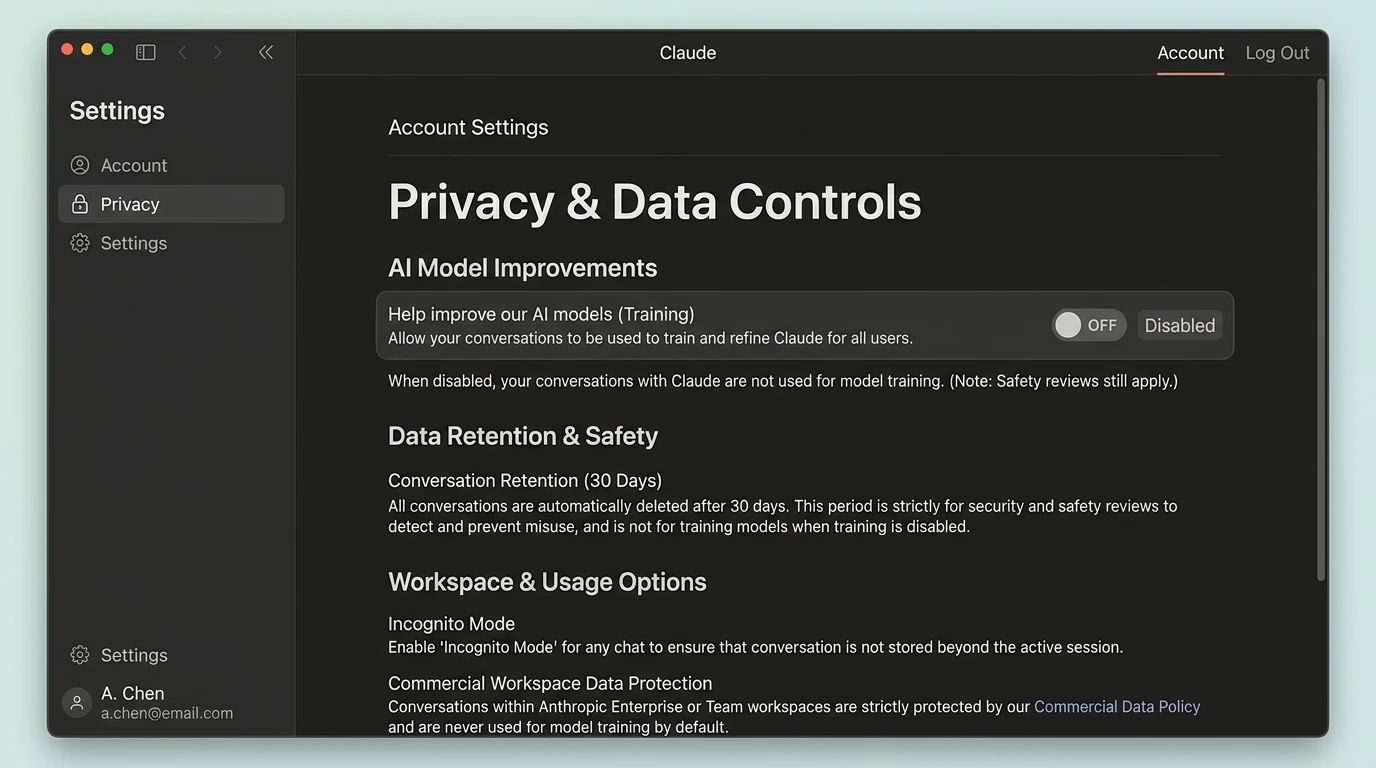
Turning off model training does not delete existing conversation history.
Anthropic further mentions that opted-out accounts can have a reduced safety-retention period for abuse detection.
Practical implication:
If you are dealing with sensitive client information, proprietary code, or any other kind of regulated data, then you should be using a dedicated commercial workspace, or disable the model training feature on a consumer account, wherever possible.
Strengths and Practical Limitations
The following assessment is based on Anthropic’s documentation and Flamica’s testing.
Documented and Observed Strengths
Instruction and constraint adherence
In Flamica’s Artifacts and Claude Code testing, Claude consistently followed negative constraints such as preserving untouched functions, avoiding external dependencies, and following required output formats.
It also showed relatively little conversational drift during these tests.
Clear separation of deliverables through Artifacts
Artifacts keep code, documents, and interface components separate from the main conversation.
This makes it easier to inspect work, make changes, and reuse the result without searching through a long chat.
Repository workflow through Claude Code
Claude Code removes much of the copying and pasting between a browser and a code editor.
Its terminal-based workflow, CLAUDE.md context, and interactive diff approval make it useful for multi-file development work.
Research citations
Claude Research provides numbered citations connected to source URLs.
In Flamica’s test, 11 of 12 checked citations led directly to primary documentation pages.
Commercial data boundaries
Anthropic’s documented commercial data policy excludes Team, Enterprise, and API customer data from model training by default.
Practical Limitations
Plausible errors still occur
However, even with its impressive power and capabilities, Claude may generate misleading statements.
It becomes particularly crucial to take into account the above when dealing with highly dynamic circumstances, professional legal data, and unverified statements.
Higher reasoning effort can increase latency
High or maximum effort can take longer and use more capacity.
That can be useful for difficult reasoning, but it is unnecessary for many routine writing tasks.
No native image generation
Claude does not include an image-generation engine.
It can analyze uploaded images, diagrams, and screenshots. It can also generate SVG code and web layouts.
It does not generate raster artwork or photographs.
Agentic work can use usage capacity quickly
Extended thinking and multi-step Research can consume usage allowances faster than ordinary conversations.
Users on lower tiers may reach their limits sooner during intensive research or coding work.
Terminal execution still needs human oversight
Claude Code includes approval steps, but an AI agent working in a local terminal can still affect files and configurations.
Developers should inspect commands and Git diffs before approving them.
Flamica’s First-Hand Testing Methodology
This review keeps official product information separate from Flamica’s direct observations.
The process is:
- Anthropic official documentation.
- Documented product facts.
- Flamica controlled testing.
- First-hand observations.
- Editorial synthesis.
Then ask:
- Is there enough evidence for this claim?
- Yes – publish it with proper context.
- Yes, but partial – properly qualify the claim.
- No – don't include this assertion.
This way the review will stay relevant, without making a little test into a benchmark.
Controlled Test Matrix
| Evaluation Area | Test Environment | Documented Result | Observed Boundary |
|---|---|---|---|
| Artifacts Prototyping | Test environment: Synthetic financial analytics dashboard specification. | Result: Clean HTML and JavaScript dashboard compiled, with negative constraints upheld for three revisions. | Boundary of observation: Sandbox browser environment, not a CI/CD pipeline. |
| Research and Citations | Test environment: Comparative analysis of enterprise AI platforms. | Result: 14 assertions synthesized, with 11 out of 12 citations referencing primary sources and no broken links. | Boundary of observation: One citation led to the overview page, not the exact section. Still manual checking is needed. |
| Claude Code CLI | Test environment: Synthetic Node.js project consisting of 18 files and 1,200 lines of code. | Result: CLAUDE.md rules loaded successfully, exact Git diff proposed and interactive approval enforced. | Observed boundary: Execution is limited by local shell permissions and developer oversight. |
| Long-Context Document Extraction | Test environment: 120-page synthetic technical and compliance policy document. | Documented result: Eight nested security constraints were extracted accurately, with zero hallucinated parameters in the test. | Boundary observed: The document was highly organized. Scans that are not highly organized should undergo preprocessing before analysis. |
Tests are not aimed at proving that Claude is an absolute benchmark winner.
The questions are more practical:
What actually happened?
What were the limits of the test?
What does the evidence not prove?
That is the standard Flamica uses for this review.
A Practical Claude Workflow for Business and Engineering Teams
Claude can be included within a workflow process of business and engineering tasks instead of being a standalone chatbot.
A possible example of a pattern would be demanding structured output from the model.
For example:
{
  "audit_status": "requires_changes",
  "security_risk_level": "medium",
  "identified_issues": [
    {
      "file": "middleware/auth.ts",
      "line_reference": 42,
      "description": "Session token expiration check lacks clock skew tolerance",
      "remediation": "Add 60-second leeway buffer to token expiration validation"
    }
  ],
  "requires_human_approval": true
}
That result can then be passed through a validation script.
For example:
interface AuditResult {
  audit_status: string;
  security_risk_level: string;
  identified_issues: Array<{
    file: string;
    line_reference: number;
    description: string;
    remediation: string;
  }>;
  requires_human_approval: boolean;
}
function processAudit(result: AuditResult): void {
  if (result.requires_human_approval) {
    queueForEngineeringReview(result);
  } else {
    logAuditPass(result);
  }
}
The idea isn’t what particular code you use.
The idea is the workflow itself.
Rather than take in any sort of AI response freely and then act on it immediately, that output can be shaped, analyzed, and sent to a human who needs to give their approval.
That is the difference between just asking an AI chatbot a question and designing a workflow based on it.
Who Claude Is Ideal For
There are some jobs for which Claude is ideal.
Software engineers and developers
Claude Code will assist you in your development in the terminal, in refactoring multiple files, getting acquainted with new repositories, and developing Artifacts.
Researchers and technical analysts
Research can help you in your multistep research and cited sources. Claude is also helpful for large document analysis and synthesis from lots of files.
Writers, editors, and content strategists
Claude will be helpful in your long-form writing and editorial guidelines.
Operations and product teams
Projects can help organize requirements and customer feedback, while MCP can connect Claude with external systems and business tools.
Who Should Be More Cautious
Claude may not be the right choice, or may require additional controls, when:
- You need image generation. Claude does not create images or digital artwork.
- You expect completely autonomous execution. Terminal and agentic actions can change files and configurations, so they need supervision.
- You have no budget for intensive workloads. Free usage can be reached quickly during heavy reasoning or coding tasks.
- The cost of being wrong is extremely expensive. High-stakes decisions involving legal, financial, clinical, or other matters need to be double-checked by appropriate experts.
Claude vs ChatGPT vs Gemini
This page is a comprehensive review of Claude, not a direct head-to-head comparison.
For detailed comparisons using specific tasks and criteria, see Flamica’s dedicated comparison pages:
- Claude vs ChatGPT — Detailed comparison of reasoning, coding, workflows, and tool ecosystems.
- Claude vs Gemini — In-depth analysis of context windows, Google Workspace integration, and multimodal performance.
- ChatGPT Review — Flamica’s complete review of OpenAI’s ChatGPT.
On a high level:
Claude is a good fit for complex reasoning, detailed writing, developer-terminal oriented workflows with Claude Code, and working systematically with Artifacts.
ChatGPT offers an extensive consumer and productivity ecosystem that includes image creation, Canvas, and integration with third-party applications.
Gemini has tight integration with Google Workspace, big multimodal, and Google Search.
It all comes down to the task you want to accomplish.
FAQ
Is Claude AI free?
Yes. Anthropic offers a Free version via its web and mobile application.
The Free version grants access to Claude, web search, and basic Artifacts functionality, up to certain limitations.
How much does Claude Pro cost?
Claude Pro is $20 per month in the United States, with annual billing options available at a discount.
Pro provides a higher usage allowance than Free, access to supported models including Opus, extended thinking, Projects, Claude Code, and Cowork.
What are the Claude Max plans?
Max is an individual subscription tier intended for heavier users.
Max 5x costs $100 per month and provides five times the Pro usage allowance.
Max 20x costs $200 per month and provides twenty times the Pro usage allowance.
Both plans include access to Claude Code and Cowork.
Can Claude search the web and conduct research?
Yes.
Claude provides web search for current information and citations.
For more involved investigations where there is the need to conduct research by looking up information from different sources and generating reports, the paid version of Research is useful.
What are Claude Artifacts?
Artifacts are separate workspace panels that appear beside the chat when Claude creates substantial standalone work.
An artifact can have code, interactive web apps, SVG drawings, and formatted documents.
You can review, test, modify, and export these deliverables without having to keep everything inside the main conversation.
What is Claude Code?
Claude Code is Anthropic’s agentic coding tool for the local terminal and development environment.
It can inspect a repository, propose file changes through Git diffs, run build and test commands with approval, and follow instructions stored in a CLAUDE.md file.
What is Claude Cowork?
Claude Cowork is an agentic desktop feature available through the Claude Desktop app for paid users.
It provides a side-panel browser and connected tools for multi-step research and document tasks while keeping the user involved in review and approval.
Does Claude train on my data?
For personal accounts such as Free, Pro, and Max, conversations may be used for model training by default. Users can use their privacy settings to unsubscribe.
In terms of business plans like Team, Enterprise, and API, by default, Anthropic does not train any of its generative models with customer data.
Can Claude generate AI images?
No.
Claude does not come with an image-generation model.
It can analyze images that are uploaded to it and can also write code for web design, but it cannot create AI images.
What is the Model Context Protocol (MCP)?
The Model Context Protocol is an open standard introduced by Anthropic for connecting AI applications with local files, databases, third-party software, and internal developer tools through a standardized interface.
Final Assessment
Claude is no longer best described as just a conversation window.
It has grown into a focused workspace for technical, research, writing, and analytical work.
You can use it for ordinary conversations.
You can use extended or adaptive reasoning for more difficult problems.
You can conduct multi-step research with source citations.
You can build and preview interactive work in Artifacts.
You can organize knowledge and instructions in Projects.
You can work on full code repositories through Claude Code.
You can delegate browser and document tasks through Cowork.
You can connect external systems through the Model Context Protocol.
But the more capable the system becomes, the more important clear boundaries become.
For terminal work, that means approving commands and reviewing Git changes.
For research, it means checking the sources behind the citations.
For business information, it means understanding the privacy and data controls.
For code, it means running tests before accepting changes.
The most useful question is not:
“Is Claude the smartest AI?”
A better question is:
“Does Claude reliably handle the technical and analytical work I need, under the right controls, and where does human verification remain necessary?”
That is the question this review is designed to help you answer.
Last verified: October 6, 2026.
Source Verification
Current product capabilities, policies, and pricing in this article were verified against official Anthropic documentation on October 6, 2026, including:
- Anthropic Models & Context Windows
- Extended & Adaptive Thinking Documentation
- Claude Web Search Help Center
- Using Research in Claude
- Claude Artifacts Overview
- Claude Projects Guide
- Claude Code Official Documentation
- Claude Cowork Desktop Overview
- Computer Use Tool Platform Documentation
- Model Context Protocol (MCP) Specification
- Claude Pro Pricing & Subscription Help
- Claude Max Subscription Tiers
- Claude Team and Enterprise Plans
- Privacy and Data Controls in Claude