

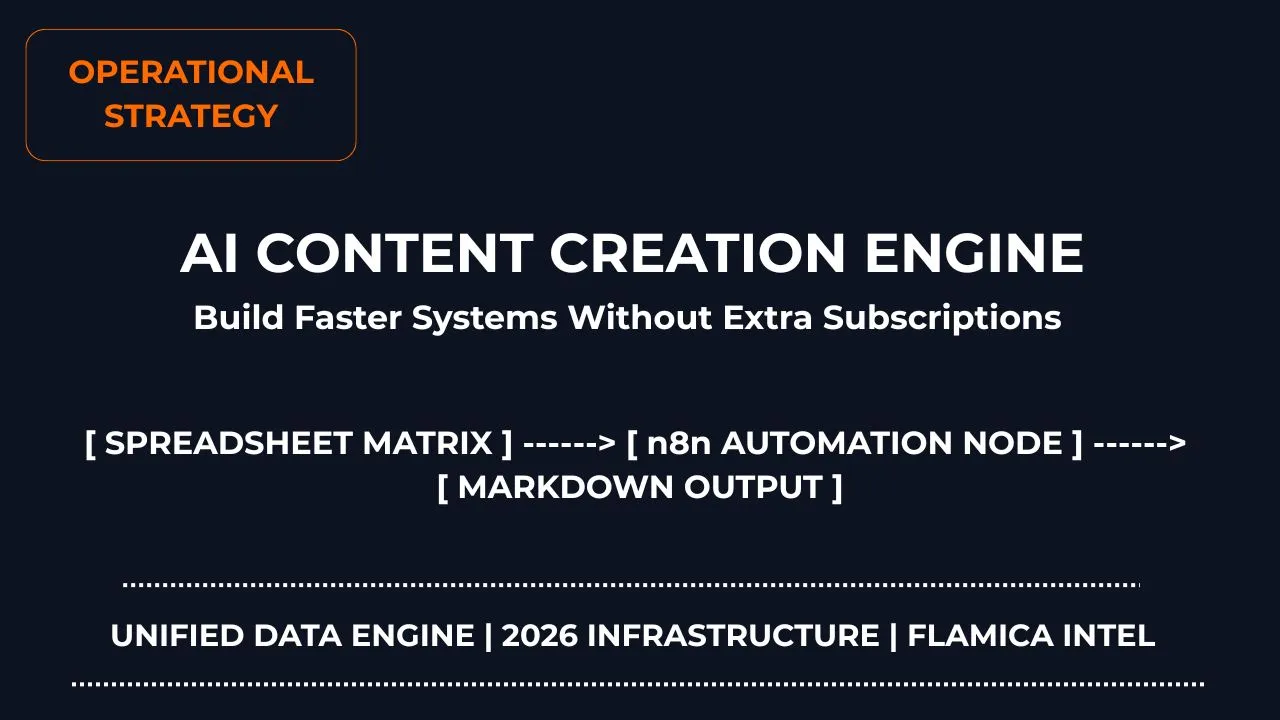
Most business owners and marketing teams fall into a simple trap. They think getting faster at writing means signing up for another expensive AI web tool.
Every time a new writing tool launches, they buy another seat. Before they know it, their monthly software bill is hundreds of dollars. A writer has to sign into three different sites for creating even one piece of content. Things pile up on the shared drive, content is lost, and everyone gets overloaded.
However, this is only half of the problem.
Using artificial intelligence for writing isn’t all about typing at a higher speed than before.
In fact, what makes it work is establishing an automatic system which is efficient, organized and built into tools you use daily. When an AI writing process gets automated using Google Sheets, all of your writing processes become automated. You can coordinate your planning, drafting, and social media repurposing in one place—without paying a single dollar in extra software subscription fees.
System Snapshot
How can you scale your content creation efforts without spending on additional AI tool subscriptions? One can set up an economical and automatic workflow using Google Sheets and n8n while using API keys on a pay-per-use basis. The spreadsheet holds the topic and keyword. n8n watches the status dropdown. When the dropdown changes to 'Queue', n8n pulls the row data, sends it to Claude or Gemini via API, and dumps the raw outline and draft back into the sheet. No manual copy-pasting. No monthly SaaS tax for each team member. Just a clean dashboard that outputs articles for pennies.
System Performance & Cost Metrics:
- Average Cost Per 1,500-Word Blog Post: $0.08 (using API keys)
- Time Saved Per Long-Form Article: 3.5 hours
How do I create content faster using AI?
If you are still opening a ChatGPT tab, typing "write a blog post about X," and copy-pasting the output into Google Docs, you are doing it wrong.
Let's be honest. That loop is slow. It is tedious. And it forces you to act like a glorified copy-paste assistant.
Worse, the content usually sucks. It sounds robotic because the AI is guessing what you want. It has no idea who your audience is or what tone you like.
True speed doesn't come from writing a clever prompt. It comes from process design.
A solid AI blog workflow breaks the writing process into tiny, structured steps. First, you scrape forums to see what your readers actually care about. Next, you generate a clean heading outline (H2 → H3) that matches search intent. Only then do you draft the paragraphs, keeping things simple and clear. Finally, you spin that blog post into emails and social media updates.
When you build a system around this process, you stop typing prompts. You just feed topics in, and let the system assemble the parts.
👉 SEO automation workflow using Reddit — How to mine real-time user questions for high-ranking content ideas.
Which AI tool is best for content creation?
I spent the last 30 days testing Claude, Gemini, and a few local models in a real-world pipeline. The results shocked me. Most people are choosing the wrong AI because they look at brand names instead of execution.
Here is the truth: no single tool does everything well.
Some models excel at deep web research. Others are great at writing clean, conversational English. A few are built specifically to handle complex background tasks. If you try to force one tool to do everything, you end up with generic, low-quality drafts.
We found that the strongest systems combine separate models for specific tasks:
- Claude: It is hands-down the best for writing long-form paragraphs that sound human. It mimics your style DNA without sounding cheesy.
- Gemini: Use it for real-time web research. It scans live data and documentation faster than anything else.
- Local Models (like Llama 3 via Ollama): Great for sorting data, filtering files, and handling small tasks on your own computer without using API credits.
The most powerful setup does not rely on a shiny new app. Instead, it requires linking these models straight into your team's current working environment. Through integrating AI models into a single dashboard, you will keep your workflows streamlined and your expenses minimal.
How do I automate content creation with AI?
There is no need for complicated software solutions when automating content creation for your business. All you need is three core components: a spreadsheet, automation glue tool, and your prompts.
Consider Google Sheets to be your dashboard, which you use for scheduling topics, entering keywords, and checking status updates. The fact that your team is familiar with this solution saves you time on learning new tools.
What follows is integrating an automation glue tool, such as n8n, in the backend.
n8n runs in the background. It observes your spreadsheet. Once a writer updates the status field to 'Queue', the automation is triggered. It takes the keyword, passes it to the AI, waits for the output, and enters the generated text into the spreadsheet.
By using Google Sheets for content workflow, you do not have to purchase software seats for every writer on your team. They stay inside the spreadsheet. The automation handles the rest.
Which AI can turn ideas into ready-to-publish posts?
The short answer? None of them.
You will be in for a shock if you believe that you will draft an article and publish it, and then see your rankings go through the roof.
Google doesn't have anything against AI-written content, but it hates generic and repetitive content. If your article appears to be a simple rehash of the top five search results on Google, your article will not make any sense.
But AI is fantastic at doing the hard work.
With a proper content automation system, one raw topic idea in a spreadsheet row can generate:
- A fully researched blog outline.
- A complete first draft addressing real user queries.
- An optimized meta description under 160 characters.
- A quick social media post to promote the article.
This turns a single topic row into a complete package of structured assets. It's not about producing text; it's about producing structured files that are ready for your team to fine-tune and publish.
Case Study: How a Content Team Grew Their Content Creation With a Self-Hosted Solution
Let me illustrate how this all comes together in practice. Recently, we've worked with a marketing company and completely migrated their writing process away from costly SaaS solutions to a local environment. We set up an environment for the writing team by combining our own AI content writing solution and Google Sheets content workflow.
The problem: monthly SaaS tax
An average marketing company paid $290 per month for an AI content writing solution to keep up with the writing of five writers on board. The writers used to spend a lot of time copy-pasting outlines from the solution and setting headings in Google Docs manually.
The Solution: n8n Google Sheets Automation
We replaced the expensive software with a central n8n Google Sheets automation pipeline. The team set up their editorial board directly in a spreadsheet. We mapped the columns to store the keyword, target audience, blog outline, and drafts.
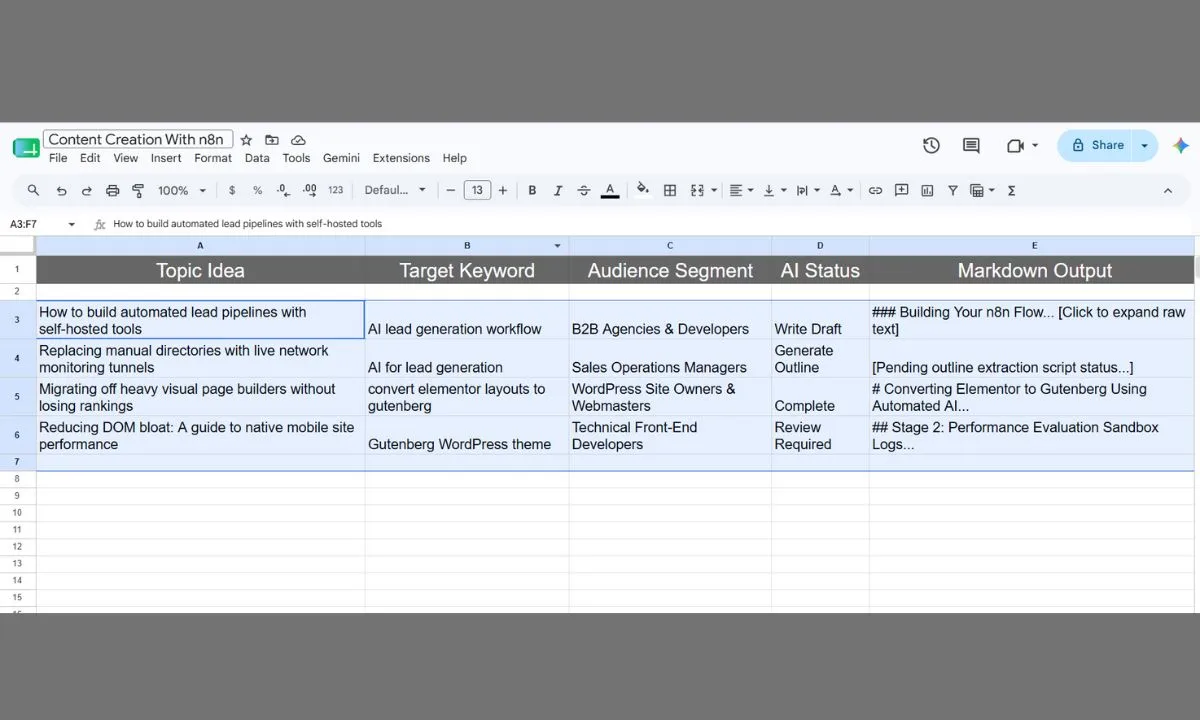
When a writer changed the status dropdown of a row to "Generate Brief," the n8n automation engine pulled the row parameters. It sent a structured prompt to Claude's API, generated a detailed outline, and wrote the markdown directly back into the "Outline" column.
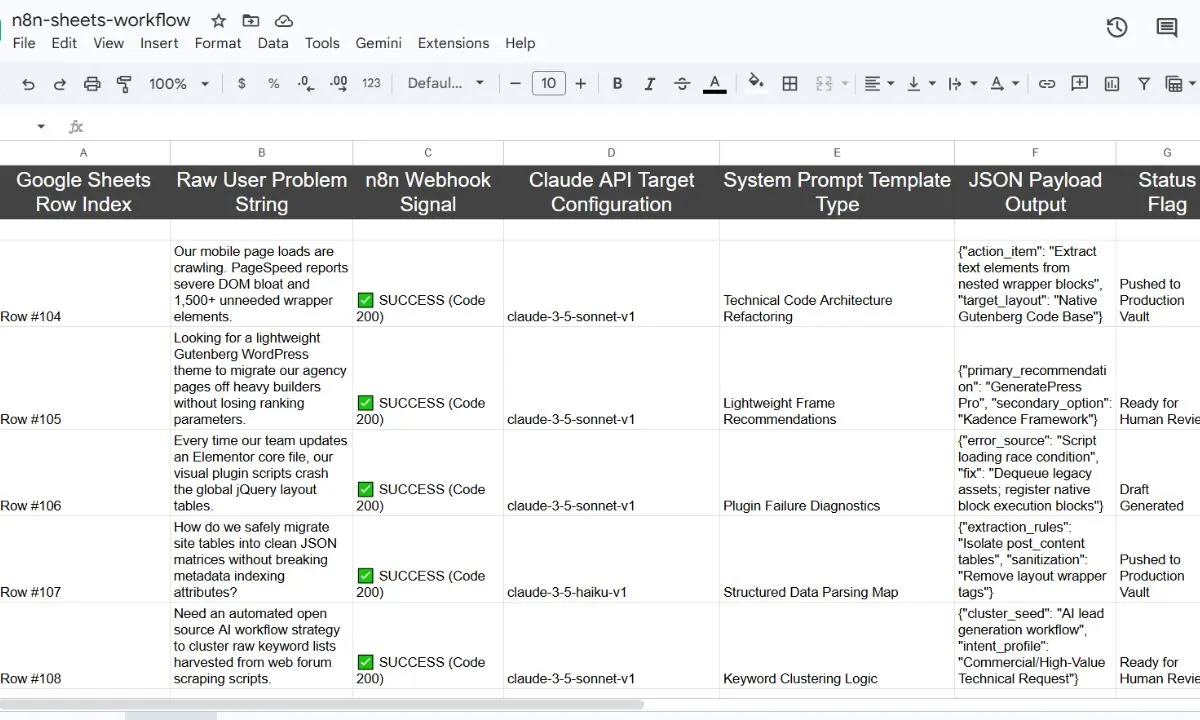
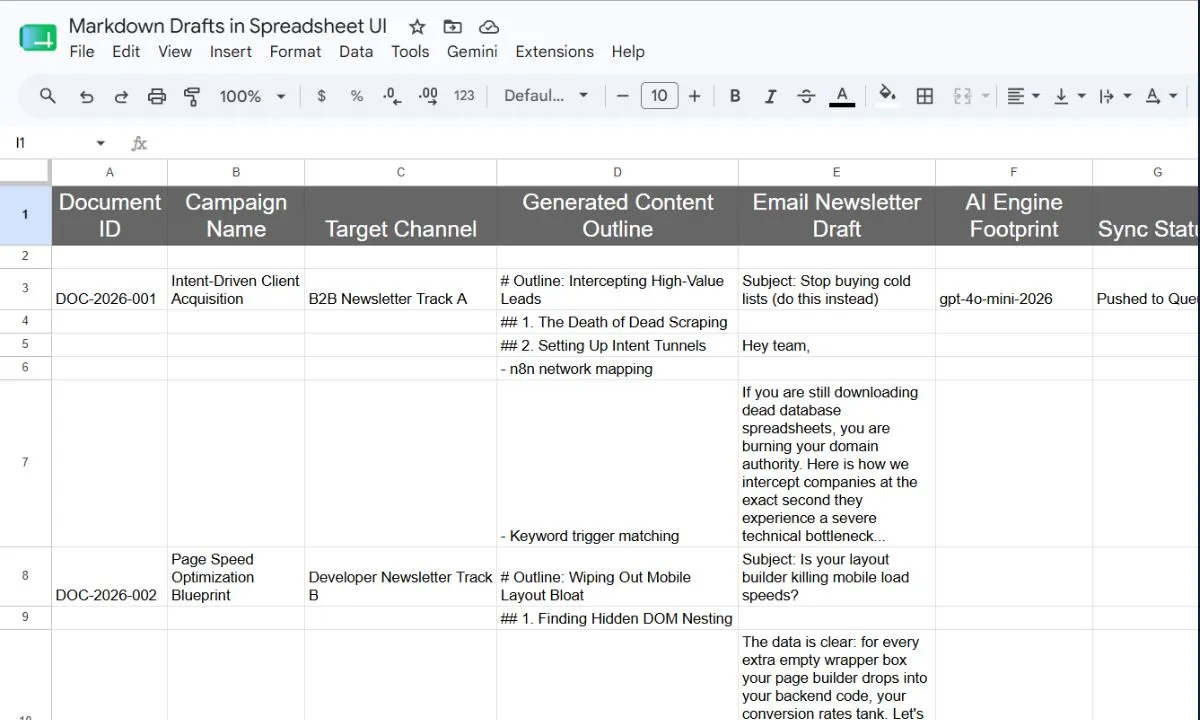
Once the editor approved the outline, they changed the status to "Write Draft." The system automatically wrote the full text and returned it to the spreadsheet in under two minutes.
The Results: Massive Savings and Faster Output
With this move to a self-hosted content system, the agency saved more than $275 per month of software expenses and reduced them to under $15 (only paying for the actual API tokens used). Even more important, their content throughput increased twofold since the writers did not have to switch applications anymore.
Here is a brief summary of the advantages of the self-hosted solution compared to the software subscriptions:
| Feature | Multi-Seat SaaS Subscriptions | Self-Hosted Sheets + n8n Workflow |
|---|---|---|
| Monthly Cost (5 users) | $250-$500+ | $10-$20 (pay-as-you-use API tokens) |
| Customization | Limited to the vendor's offerings | 100% control over the prompt and the style DNA |
| Workflow Friction | High (copy-paste all the time) | Zero (runs on Google Sheets) |
| Bulk production | Manual, 1 post at a time | Automated batch process |
Can AI write blogs that rank on Google?
Yes, but there is a twist.
It does not matter for Google whether the content was written by an AI, squirrels, or a human being. The matter is the quality. If you publish raw AI text, you will fail.
Models tend to use predictable sentence structures and repetitive words. AI detectors pick up on this pattern instantly. More importantly, search engines do too.
That is why human editing is your secret weapon.
Use AI to build the framework. Let it do the research, map out the headings, and draft the first draft. Then, have a human editor step in. They should:
- Add real-world case studies and examples.
- Eliminate generic AI transition words ("moreover" or "in conclusion").
- Ensure your sentences vary in length to give the writing a natural flow.
It is the perfect combination for building a search traffic engine that will rank.
👉 AI stack for an individual business owner — Creating a lean and highly productive system without hiring a big team.
How can I use AI without subscribing to additional services?
The answer is pretty straightforward - just stop paying for software seats and switch to API keys.
When you subscribe to the monthly plan on some AI writing service, you are paying the very steep markup. They charge you not only for running their servers but also for the interface and advertising campaigns.
However, when you work with their AI through API keys, you pay only for what you use.
For instance, generating a 1,500-word article via Claude's API costs around 8 to 10 cents. The monthly plan for writing software goes from $30 to $50.
By setting up a self-hosted AI content system using n8n and Google Sheets, you bypass the SaaS tax entirely. You can add ten writers to your spreadsheet dashboard without paying a single extra cent in software subscriptions. You only pay a tiny, pay-as-you-go bill for the raw API tokens.
Conclusion: Build Systems, Not Subscriptions
The most successful agencies and creators are moving away from scattered AI tools. They realize that buying more software seats just adds clutter and drains their budget.
Instead, they are investing in custom AI content planning workflows. By embedding content automation directly into simple, familiar systems like Google Sheets, they get:
- Zero SaaS Tax: You only pay for the raw API credits you actually use.
- Absolute Simplicity: Your team works out of a single spreadsheet instead of five different websites.
- True Scalability: You can run batch workflows to generate outlines, drafts, and social media posts automatically.
The future of writing belongs to teams that own their systems. Stop renting workspace templates from expensive third-party tools. Build a self-hosted content engine that grows with your business.
Ready to build your own custom AI content system? Click here to book a content workflow strategy call and let me build your automated publishing engine.
Frequently Asked Questions
What is AI content creation?
A: AI content creation is the process where you use artificial intelligence tools to create content, rewrite content, summarize lengthy texts, or simply organize text in formats suitable for blogs, emails, social media posts, and scripts. It is most effective when you need drafts quickly. The human element comes in when editors must edit the content to match a specific style, tone, subject-matter relevance, and accuracy.
Which AI tool is best for content creation?
A: Most AI tools work in a similar manner, with one tool excelling over another in fulfilling a specific task. For example, Claude is excellent at writing natural, conversational drafts that match your brand voice. Gemini is great at scanning real-time web data and handling large volumes of research. You can build systems that connect these separate tools to a central dashboard.
How do I use AI for content creation?
A: The best way to use AI is by treating it as the brain of a structured workflow. Random chats create inaccurate and robotic outputs, while a system built to optimize structured inputs (like keywords and target audience details) runs them through automated templates to generate outlines, drafts, and social posts systematically.
Can AI content rank on Google?
A: Yes. Google’s algorithms focus on core elements like grammatically correct text, relevance, and the helpfulness of the content. Editors play a role in ensuring the text aligns closely with the topic, and that other elements—like your brand's specific tone and style—are met. In other words, to rank well, your articles must align with search intent, contain original insights, and be polished by a human editor to remove robotic phrasing.
How do I create content faster with AI?
A: The fastest way to write is to automate the repetitive steps of the production cycle. By setting up a central dashboard like a Google Sheets content workflow connected to an automation engine like n8n, you can generate outlines, drafts, and repurposing templates in bulk without manual copy-pasting.