

Last updated: July 2026
Stop Losing Hot Leads
Most company websites are static digital brochures. Visitors complete lengthy forms and wait hours—or days—for a reply. This actually burns up marketing spend and drives hot prospects directly to the competition. Your site does not have that dynamic with intelligent automations.
Instead of static forms, think active and automated steps to make the website your 24 × 7 working engine taking breaks with scoring leads, scheduling meetings, and answering questions without any fatigue.
Operational Extract
For system architects, web operators, and conversion managers designing automated database pipelines, here is the baseline engine optimization layer:
- The Ingest Blueprint: Start with a single clear job of one type, likely either lead qualification, support deflecting (chatbots), booking (they are typically bots that offer schedules/ calendars as advice on the next steps for you to continue your inquiry) or content capture such as reviews etc and then route that workflow directly into something external like the CRM, email, calendar or any other internal tool.
- The Intelligence Harness: The most valuable ones are narrow and quantifiable (and often hybrid) with Layer One being AI, and the more difficult or high-intent conversations being filled by a human.
Section 1: Best Entry Points for Adding AI Workflows
Operating with new tech is always a daunting task. One way to stave off project fatigue is to look for some low hanging fruit. Do not try to automate your entire operation overnight. Start with a single high-impact entry point that directly affects your bottom line or relieves customer support pressure.
Add the easiest website AI workflows:
- AI Chat for Lead Qualification: Ask important questions naturally. Identify budget, timeline, number of employees, and specific requirements Now, the system scores the lead in real-time and sends them where they need to go.
- AI Support Triage: Answer common questions using your documentation. If the issue is complex, collect details and hand them over to a human rep with a structured summary.
- AI Booking Assistants: Skip back-and-forth emails. Qualify prospects during the chat and display calendar booking links only to those who meet your sales criteria.
- AI Form Enrichment: Keep frontend forms short to increase conversions. Let your backend system take the user's name and domain, scan their public footprint, and enrich the database entry with structured business data.
For most operations, lead qualification is the best starting point. It reduces time-to-lead, shortens manual screening and populates your pipeline with buyers ready to obtain. And this new technique transforms your site from a brochure into an actionable intake system.
How the Workflow Works
A tangible setup on a business site has a really simple, repeatable formula:
- High-Intent Capture: When a visitor lands on a high-intent page (pricing, services, contact etc).
- Interactive Intake: Rather than presenting a 20-page form, it initiates a natural conversation or delivers an intelligent progressive form.
- Scoring & Routing: The system evaluates the response quality and urgency. High-fit leads are offered a booking link or routed to active reps. Low-fit inquiries are directed to helpful resource guides or email nurture sequences.
- Structured Summary Delivery: The system translates the raw conversation into a neat bulleted summary. Your team receives context, not a massive chat log transcript to read through.
Compared to static forms, this progressive profiling method gathers context naturally and personalizes the upcoming question according to the responses received. This is where the hybrid handoff provides some magic.
What to Connect
Your website automation layer becomes highly effective only when it connects directly to the software systems your business already uses.
| Website Trigger | AI Action | Target Destination |
|---|---|---|
| Visitor opens chat on services page | Qualifies intent, answers FAQs, extracts company size | CRM record, Slack notification, calendar scheduler |
| Visitor submits contact form | Summarizes inquiry, evaluates urgent needs, tags priority | Sales inbox or pipeline deal stage |
| Visitor asks support question | Pulls from knowledge base and suggests next step | Help desk or human agent queue |
| Visitor downloads a resource | Personalizes follow-up based on topic interest | Email nurture workflow |
For example, an AI for an agency or service business: What do you need help with? Capture urgency, plus email details and push only qualified leads to a booking page (everyone else into follow-up email lists − everyone)
Implementation Rules & Recommended Rollout
To launch successfully, follow these four basic rules:
- Keep it Narrow: Automate exactly one page and one workflow first. Do not try to fix your whole site in one go.
- Early definition of Key Fields: Before you put rules in the system, be clear on what you need to capture (budget, timing, location).
- Set Guardrails: Always include direct paths to a human. Let users know they are interacting with an assistant.
- Track Outcomes: Measure final results rather than chat activity. Focus on the booked-meeting rate and the time saved by administrative staff.
Avoid adding a generic chatbot with no routing logic, no qualification criteria, and no integration into business systems. If the conversation does not update a CRM, notify your team, or trigger a follow-up, it is mostly decoration.
For a typical business website, we recommend this sequence:
- Phase 1: AI lead capture on contact, pricing, and service pages.
- Phase 2: CRM sync, Email follow-up & Booking Automation.
- Phase 3: Triage support and knowledge-based answers.
- Phase 4: Personalized content or offer flows based on page intent and visitor responses.
Section 2: How Can I Add a Simple AI Lead Qualification Form to My Website?
AI automation does not require you to install huge software suites. You can create a lightweight frontend interface in just HTML and JS that allows you to collect information, send it to your automation webhook, and update the output dynamically.
Well, here you have a code block (built to be functional and ready-for-production) that allows anyone to embed a qualification intake clean form on their website. Direct the webhook URL to an automation tool (Make, Zapier, or n8n). The specific project details will come into your backend flow, and you send those to an LLM for classification, which then returns a fast decision to lead the prospect down the correct outcome.
<div id="ai-lead-form-container" style="max-width: 500px; margin: 30px auto; padding: 25px; border: 1px solid rgba(255, 255, 255, 0.08); border-radius: 12px; font-family: sans-serif; background-color: rgba(255, 255, 255, 0.03); box-shadow: 0 10px 30px rgba(0, 0, 0, 0.25);">
  <h3 style="margin-top: 0; color: #ffffff; font-size: 1.5rem; font-weight: 700;">Find the Right Solution Instantly</h3>
  <p style="color: #94a3b8; font-size: 0.9rem; margin-bottom: 20px;">Tell us about your project, and our automated system will match you with the best next step.</p>

  <form id="ai-lead-form">
    <div style="margin-bottom: 15px;">
      <label for="lead-name" style="display: block; margin-bottom: 5px; font-weight: 600; font-size: 0.85rem; color: #cbd5e1;">Your Name</label>
      <input type="text" id="lead-name" required style="width: 100%; padding: 10px; border: 1px solid rgba(255, 255, 255, 0.1); border-radius: 6px; box-sizing: border-box; background-color: rgba(255, 255, 255, 0.05); color: #ffffff;">
    </div>

    <div style="margin-bottom: 15px;">
      <label for="lead-email" style="display: block; margin-bottom: 5px; font-weight: 600; font-size: 0.85rem; color: #cbd5e1;">Email Address</label>
      <input type="email" id="lead-email" required style="width: 100%; padding: 10px; border: 1px solid rgba(255, 255, 255, 0.1); border-radius: 6px; box-sizing: border-box; background-color: rgba(255, 255, 255, 0.05); color: #ffffff;">
    </div>

    <div style="margin-bottom: 20px;">
      <label for="lead-project" style="display: block; margin-bottom: 5px; font-weight: 600; font-size: 0.85rem; color: #cbd5e1;">Describe Your Project & Budget</label>
      <textarea id="lead-project" rows="4" required placeholder="Example: We need an e-commerce site migration with a $5,000 budget by next month." style="width: 100%; padding: 10px; border: 1px solid rgba(255, 255, 255, 0.1); border-radius: 6px; box-sizing: border-box; font-family: sans-serif; background-color: rgba(255, 255, 255, 0.05); color: #ffffff;"></textarea>
    </div>

    <button type="submit" id="submit-btn" style="background: linear-gradient(135deg, #ff8c2a 0%, #ff7c1f 100%); color: #ffffff; padding: 12px 20px; border: none; border-radius: 6px; width: 100%; cursor: pointer; font-weight: 600; font-size: 1rem; transition: background-color 0.2s; box-shadow: 0 4px 15px rgba(255, 140, 42, 0.3);">
      Analyze My Request
    </button>
  </form>

  <div id="form-feedback" style="display: none; margin-top: 20px; padding: 15px; border-radius: 8px; font-size: 0.95rem; line-height: 1.5;"></div>
</div>

<script>
  document.getElementById('ai-lead-form').addEventListener('submit', async function(e) {
    e.preventDefault();

    const submitBtn = document.getElementById('submit-btn');
    const feedbackDiv = document.getElementById('form-feedback');

    submitBtn.disabled = true;
    submitBtn.textContent = 'Processing request...';
    submitBtn.style.backgroundColor = '#93c5fd';

    const payload = {
      name: document.getElementById('lead-name').value,
      email: document.getElementById('lead-email').value,
      projectDetails: document.getElementById('lead-project').value
    };

    try {
      const webhookURL = 'https://your-automation-endpoint.com/webhook/lead';

      const response = await fetch(webhookURL, {
        method: 'POST',
        headers: {
          'Content-Type': 'application/json'
        },
        body: JSON.stringify(payload)
      });

      if (response.ok) {
        const data = await response.json();
        feedbackDiv.style.display = 'block';
        feedbackDiv.style.backgroundColor = 'rgba(16, 185, 129, 0.1)';
        feedbackDiv.style.border = '1px solid rgba(16, 185, 129, 0.2)';
        feedbackDiv.style.color = '#10b981';

        if (data.route === 'sales-ready') {
          feedbackDiv.innerHTML = `<strong>Success, ${payload.name}!</strong> Our system assessed your details. You are a great fit for our immediate consulting track. <a href="${data.bookingLink}" style="color: #ff8c2a; font-weight: bold; text-decoration: underline;">Click here to book your priority call now</a>.`;
        } else {
          feedbackDiv.innerHTML = `<strong>Thank you, ${payload.name}!</strong> We have received your project details. We will review your notes and reach out via email within one business day.`;
        }
      } else {
        throw new Error('Network issue');
      }
    } catch (error) {
      feedbackDiv.style.display = 'block';
      feedbackDiv.style.backgroundColor = 'rgba(239, 68, 68, 0.1)';
      feedbackDiv.style.border = '1px solid rgba(239, 68, 68, 0.2)';
      feedbackDiv.style.color = '#ef4444';
      feedbackDiv.innerHTML = `<strong>Please Note:</strong> We had trouble connecting to our system automatically. We received your request manually, and our team will email you shortly.`;
    } finally {
      submitBtn.disabled = false;
      submitBtn.textContent = 'Analyze My Request';
      submitBtn.style.backgroundColor = '#2563eb';
    }
  });
</script>
Section 3: Case Study: Driving Down Costs & Speeding Up Lead Capture
Previously, prospects filled out a long-form and waited for as long as 48 hours for manual reviews. This delay resulted in lost leads and high costs.
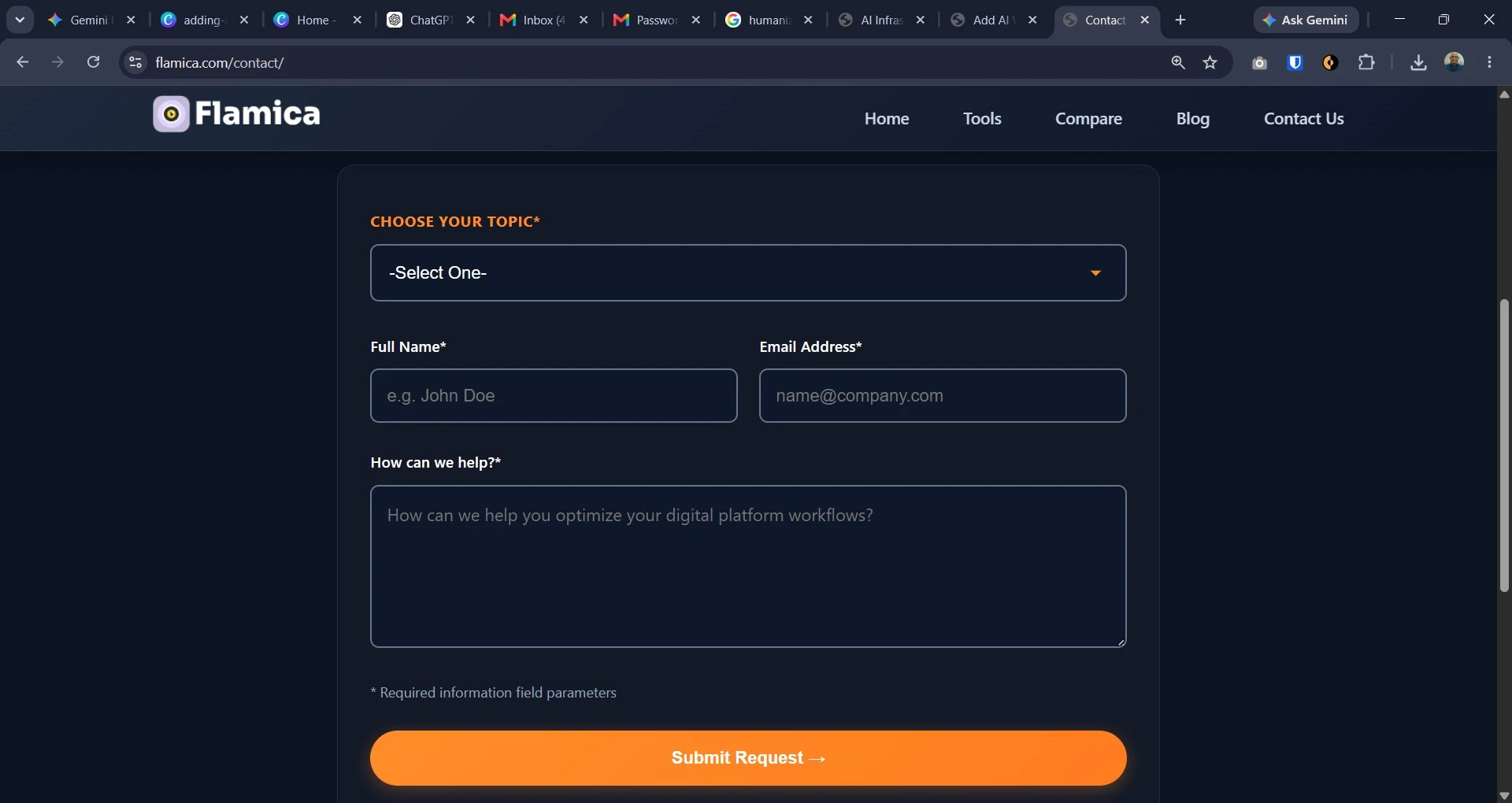
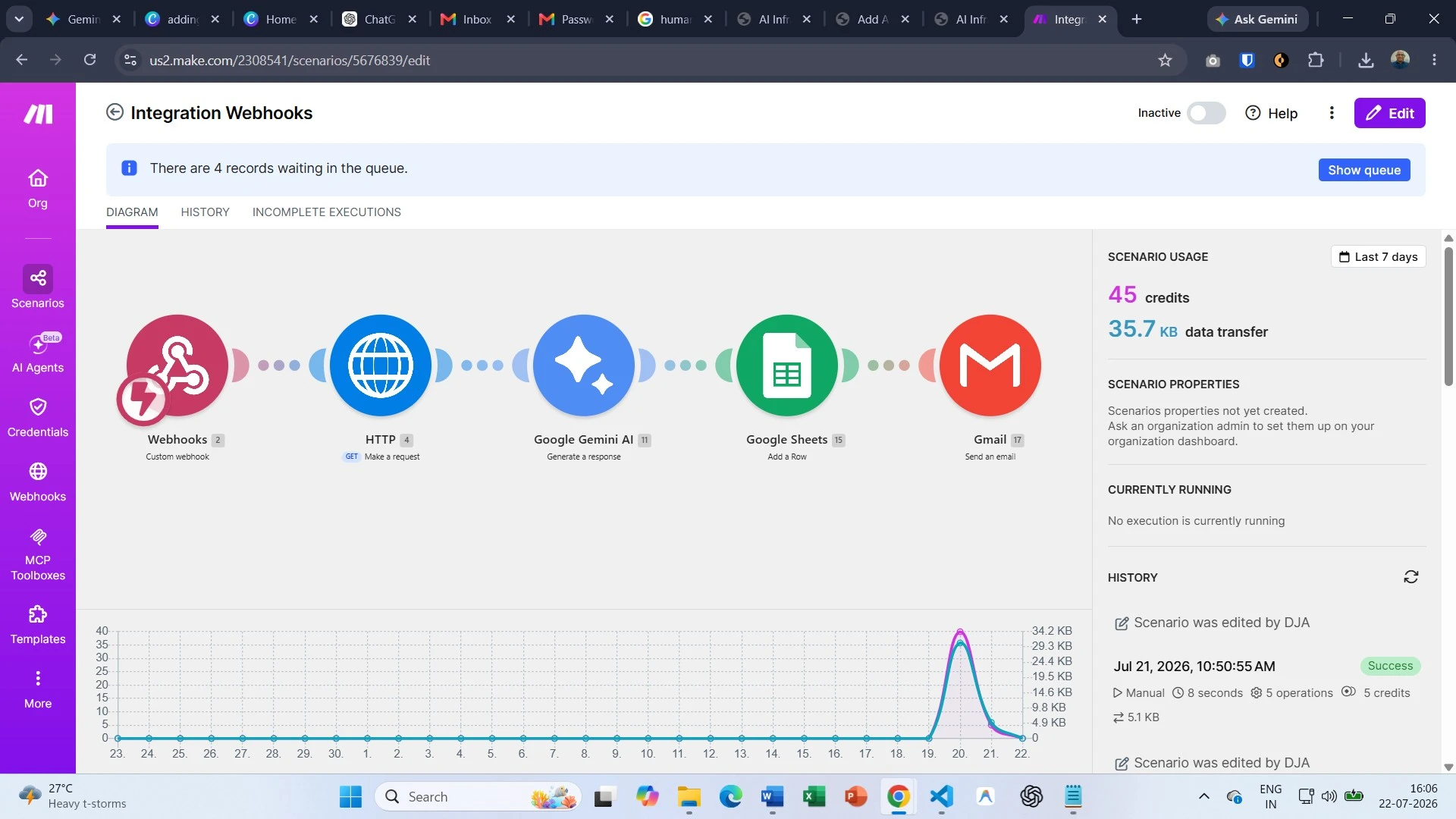
To solve this, I deployed and tested this qualification workflow directly on my website's contact page to streamline incoming inquiries and capture high-intent leads in real time.
They used a web indexing scraper to feed context into their matching models. For fast data extraction and structured file creation, they integrated Jina AI. The system scraped prospect websites instantly, compiling structured files for sales reps before they even initiated contact.
| Performance Indicator | Before AI Workflows | After AI Workflows |
|---|---|---|
| Average Response Time | 18 Hours (Manual Review) | < 2 Minutes (Instant Routing) |
| Lead Conversion Rate | 3.1% (Drop-off on long forms) | 7.8% (Progressive dialog) |
| Monthly Operations Cost | $2,400 (Admin staff processing) | $210 (API & Automation tools) |
| Qualified Meetings Booked | 14 per month | 42 per month |
Website AI Workflow Pipeline
Visitor requests demo, pricing, or custom service information.
AI collects project size, urgency, and company scope organically.
System grades inputs against operational and budget thresholds.
Instant booking schedule link shown to visitor.
Enrolled in CRM newsletter pipeline automatically.
Understanding AI Workflows: Beyond the Basic Chatbot
To implement these systems, we must understand what they represent. An AI workflow is a structured sequence of automated tasks that uses machine learning to process information, make decisions, and execute tasks. Unlike rigid rules, an intelligent pipeline handles natural text and adapts to user input.
Structured workflows are vital for AI project success. Without them, systems produce unpredictable outputs and fail to integrate with business tools. While the backend mechanics are technical, the website layer is straightforward.
Workflows differ across industries. A retail site might display personalized products, while a consulting firm screens project proposals. Regardless of your focus, successful AI strategies put workflow structure first.
Key Strategies for Designing Effective AI Workflows
Designing a reliable workflow requires clear, simple patterns:
- Data Preprocessing: Organize your data in a way that is clean and simplified. This ensures that your machine learning models are fed clean and relevant data.
- Model Deployment: You don’t always need a model that is custom trained. Pre-trained models that are connected using a low code platform reduce a lot of deployment barriers.
- Feedback Loops: Since workflows are dynamic, you should design your system to identify the cases in which the AI fails, where the human agents can modify the rules to rephrase the requests for an enhancement.
- Scalability: Develop a workflow that accommodates multiple requests using a segmented egalitarian approach. This will ensure that the client-side performance won’t suffer, despite the backend processing taking several seconds.
Practical Applications of AI Workflows Across Industries
AI deployment is showing returns across diverse markets:
- Healthcare: Clinics streamline case intakes by offering digital forms that help symptom screening, case routing, and prep for initial questions, which helps prioritizing needs and fast-tracking urgent cases.
- Finance: Firms expedite case intakes using digital forms to pre-screen requests for loans, verify borrower profiles, approve simple loan applications, and highlight complex applications for further case review.
- Retail: E-commerce sites use dynamic flows to guide shoppers to products, analyzing preferences on the fly and checking inventory databases.
- Logistics: Portals use automated workflows to track orders, instantly notifying clients of delays and coordinating with distribution systems.
- Emerging Sectors: Service companies are now using such arrangements to automate compliance checks and manage AI projects.
Best Practices for Optimizing AI Workflows
Adopting the following AI best practices will streamline your workflows:
- Data Accuracy: Ensure integrity and accuracy of incoming data.
- Automation Orchestration: Use automated workflows to manage much of your organization's repetitive and mundane tasks.
- Clarity: Be forthcoming with the end-users of your AI systems, and provide options to engage with your organization directly.
- Continuous Assessment: Evaluate the performance of your systems based on speed, errors and overall user satisfaction. Use concise and focused instructions to minimize processing time.
- Team Collaboration: Ensure sales and support review system outputs. Sales feedback is vital to keep qualification rules accurate.
Overcoming AI Challenges: Troubleshooting Your Digital Setup
Adding automated workflows can present minor hurdles. Keep your rollout within schedule by staying aware of these issues:
- Privacy & Security: Encrypt data before sending it to third parties, and ensure it won’t violate GDPR.
- Technical Complexity: Use low-code integrations and available templates to avoid the need for entire development teams, and begin with small projects.
- Model Fairness: Conduct system checks frequently to avoid disqualifying high-quality clients with prompts just because of minor phrasing.
- Organizational Change: High levels of anxiety and pessimism regarding the ultimate goal of AI implementation may be reduced by the knowledge that it's being used to relieve employees of monotonous and routine tasks.
- Troubleshooting: Adopt fallback rules to standard contact forms in the case of AI backend failures.
Future Trends: The Evolving Landscape of Digital Automation
Staying ahead of upcoming shifts keeps your business competitive:
- Automation & MLOps: Managing post automation is a breeze. Modern management tools enable oversight of web-based assistants with minimal management.
- Edge Computing: Future automation will take place in the visitor’s web browser, enhancing fast and private automation.
- Explainable AI: Decision making by modern lead assistants is easier to scrutinize and justify.
- Interactive Applications: The consolidation of websites and interactive applications favors those companies that become proficient at executing seamless, basic integrations.
Frequently Asked Questions About Website AI Workflows
Do I need a custom developer to add AI workflows to my website?
No. Using today’s low code and no code automation systems, you can link your website forms to smart backends without any sophisticated programming. Applications such as Zapier, Make, and n8n will effortlessly accept your form submissions, apply AI APIs to them, and save changes to your databases.
Will adding AI processes slow down my website load speed?
Not if you build it correctly. The key is to run the complex processing asynchronously. Your website should capture the user's input instantly, display a friendly loading state, and process the actual AI logic in the background.
How does AI lead qualification handle non-standard responses?
Unlike rigid, old-school form validators, modern language models excel at understanding natural, messy language. If the user writes, “I need a fast turnaround, budget is tight but flexible,” the AI understands the true meaning behind it and grades the lead precisely according to your business policies.
What is the difference between a simple chatbot and an AI workflow?
A simple chatbot behaves as a basic FAQ engine and answers all questions repetitively. The AI workflow, however, follows a certain process – an action on your website triggers the process where the action is analyzed by AI, your external systems (CRM system) are updated, customized follow-up content is generated, and tasks are assigned to your team.
Ready to turn your website into an active, automated lead generator? Explore our custom AI deployment services to design, build, and integrate high-impact automations tailored directly to your business goals.