

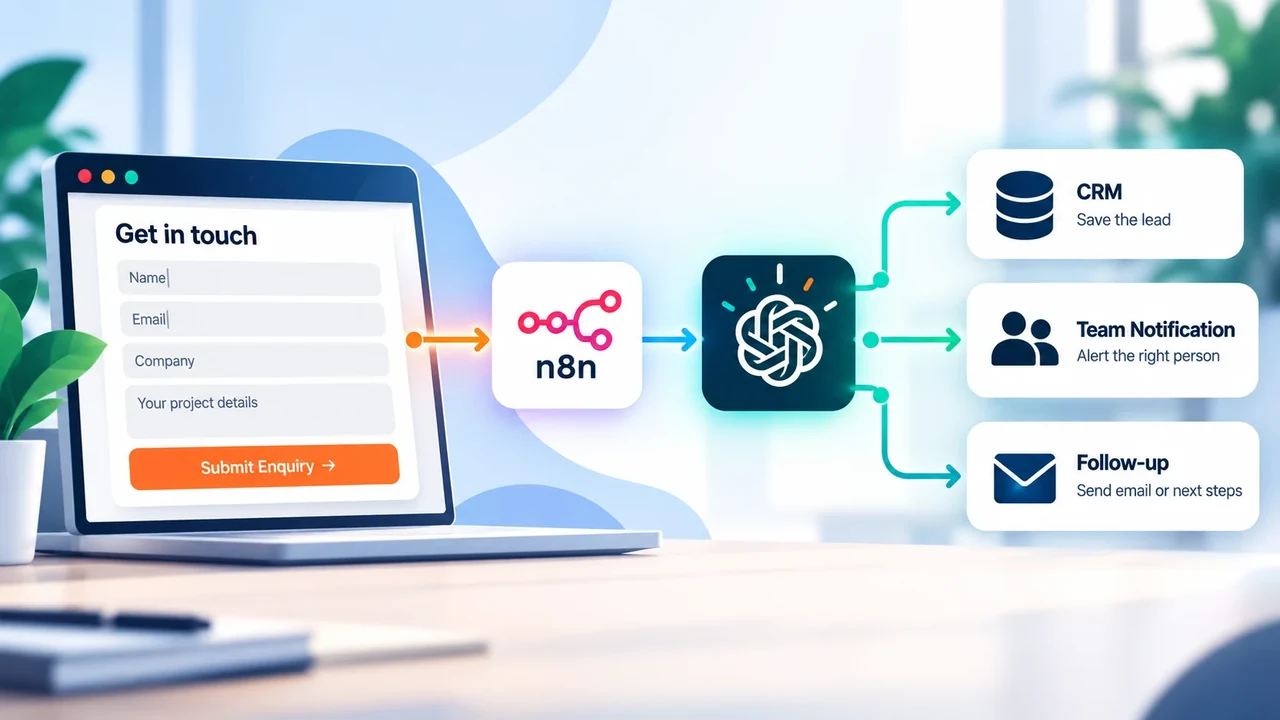
The user fills out the contact form on your website. He tells you what he needs and provides his email. What’s next?
Someone has to open the message, assign someone to deal with it, and ensure that the inquiry won’t be lost. The above mentioned data may have to be incorporated in the CRM as well as the spreadsheet.
It is simple to keep up with the process, when there are a number of queries. However, if the above mentioned tasks are completed using various forms and e-mails, then it is difficult to handle all the information.
AI and workflow automation will help you to solve the problem. You’ll be able to integrate your website into other tools you use, sort inquiries and deliver the data to the needed person.
In the example below we'll see how it can be done with n8n, where AI plays its role, and what should be considered while creating this workflow.
What Does an AI Lead Capture Workflow Actually Do?
A lead capturing workflow is one that captures an enquiry received and processes it through a number of steps. This is done with the aim of preparing the information for further actions.
For instance, consider the following enquiry received by a business that provides website development services:
"I have a small online store. I need to integrate my website enquiries with my customer database but I don't know what tools I require."
This can be collected using an enquiry form and then delivered to the inbox of the business. However, an automatic workflow can do much more than this. It could save this information in the CRM system, ask the AI to generate a summary, and alert the person dealing with such enquires.
The decision regarding suitability of the project is left up to the business owner.
How Do AI and n8n Work Together?
n8n is a platform that automates workflows. It integrates applications and allows defining how to respond to certain events.
AI has a different function here. It can be useful in processing human-readable information. It may come in handy when the customer uses their own words to describe the issue rather than select predefined options on a form.
Consider the following example:
Extract an email from the form into a database.
Analyze the customer’s message and extract the problem the customer wants to solve.
The former is done without the need for AI, while the latter could benefit from it.
In the usual workflow, the website takes the input, n8n transports the information, and the AI model processes the message when necessary. The output may then be stored in the CRM system or delivered to the relevant person.
There is no need to involve AI in all parts of the process. Moreover, separating simple steps from the AI-related ones simplifies testing and maintenance of the entire pipeline.
Building the Workflow Step by Step
Let us say that you have a form on your website from which you receive inquiries from prospective customers. You need all of these inquiries to be stored within your CRM with a brief description to help you understand their requirements.
This is how you can design such a workflow.
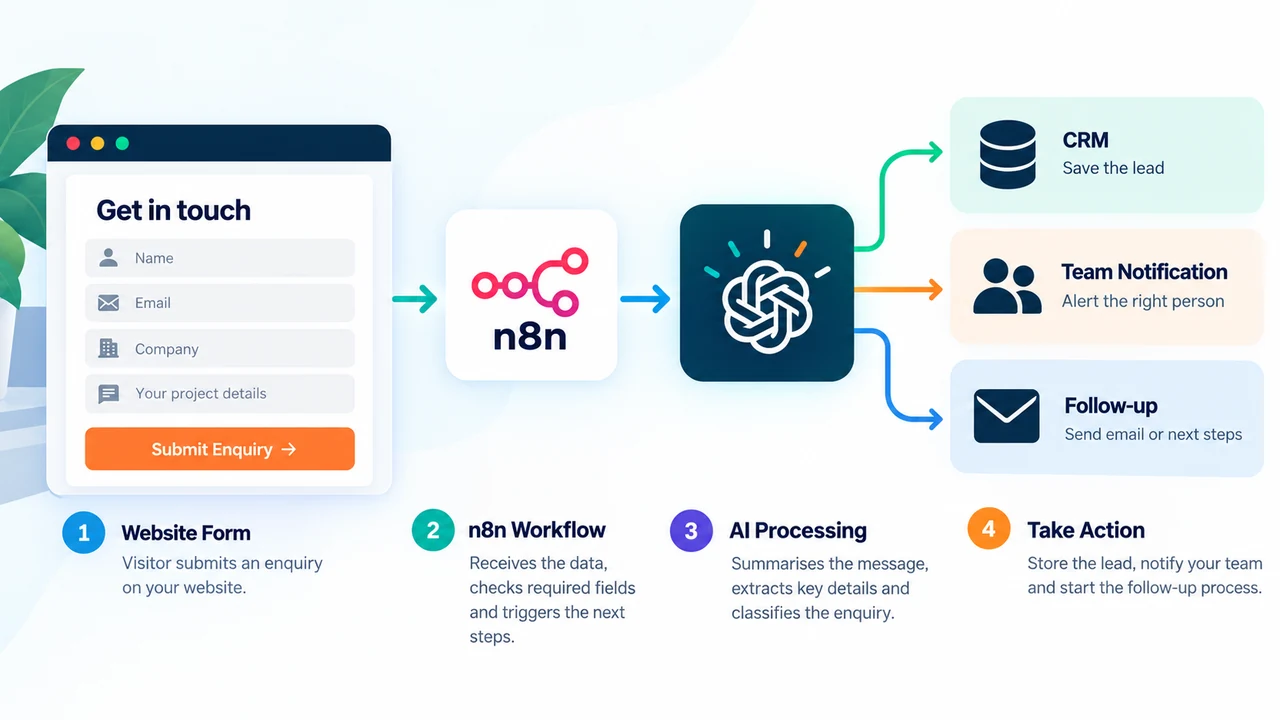
Website Lead Capture with n8n and AI
An example workflow for handling new enquiries.
Collect contact details and the enquiry.
Receive the data and check required fields.
Summarise the message and extract details.
Choose the next action or request a review.
Save the lead and notify the team.
The exact steps depend on your form, CRM, and business rules. This diagram shows a possible setup, not a tested client deployment.
1. Receive the form submission
The workflow starts when you submit your form. Your website sends the form information to n8n, either via a Webhook or any other integration method.
The submission can include a name, e-mail address, company, and the description of the project.
Before passing the information to any other step, validate that all the necessary fields are included. You can also validate to avoid duplicate entries.
These validations are just simple workflow steps. They don’t require any AI model at all.
2. Ask AI to organise the enquiry
The following process is helpful when the customer writes something that has to be deciphered.
For instance, the customer says:
"We use the spreadsheet to monitor queries sent from the website. We would like to transfer this information to the CRM and notify the person responsible for the inquiry."
And an AI model may generate the following summary:
The existing problem is that the enquiries are currently tracked in a spreadsheet.
The required change is to connect the website to the CRM.
The additional requirement is to notify the person who handles the lead.
The remaining information is which CRM will be used.
Thus, the team members receive an overview of what has been requested without reading the entire message.
However, there is one important issue. Sometimes AI may misinterpret the message or miss something important. Therefore, the workflow must ensure that the original inquiry will remain untouched, and the team will have the opportunity to review the summary generated by AI.
3. Apply your business rules
After the data is organized, n8n can make decisions about what action to take.
One person could receive inquiries regarding website implementation while another person receives those regarding workflow automation. In case the client hasn’t provided sufficient information, the workflow will recognize that the inquiry needs to be reviewed.
AI can detect what kind of inquiry is made, but the routing rules need to be set by yourself. The wrong person might get the inquiry otherwise.
In making an important sales decision, do not base your decision on AI’s score only. A brief message doesn’t mean that the client is not suitable for your product.
4. Save the lead and notify the right person
Following this, n8n can create a record of the customer in the connected CRM or database. N8n may even send out an email or any other notification with all the details along with the summary.
The person who is handling the enquiry will have all the details at once.
You need to plan for the scenarios where something goes wrong. For instance, if the CRM is offline or an API call returns an error, then the workflow needs to log the error.
Which Tools Do You Need?
It’s possible that you already have everything you need. The process can be as simple as starting with your current website form, using n8n, and then moving to your CRM or database.
| What you need | Possible tool |
|---|---|
| Collect website enquiries | Your existing contact form |
| Connect the steps | n8n |
| Summarise customer messages | An AI model with API access |
| Store lead information | Your existing CRM or database |
| Notify the team | Email or a connected messaging app |
Depending on the existing applications that you have in place, the configuration will be different. There is absolutely no need to use another application unless it solves an existing problem.
In addition, self-hosting n8n will not turn all parts of the process into a free one. Some hosting, maintenance costs, API costs, and other connected apps will have to be paid for separately. Check the current n8n pricing and licensing details before deciding how to run it.
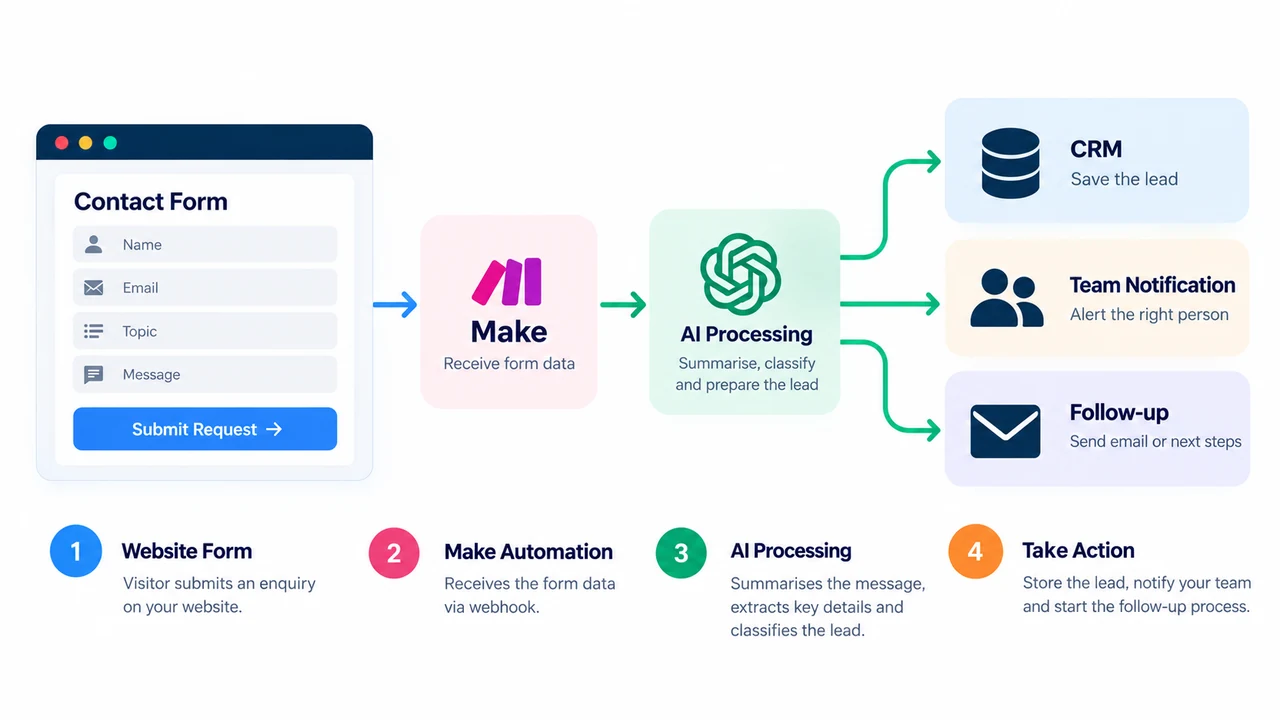
A contact form is more than just a place for one to enter their name, email, and message. It can also start a workflow that sends the enquiry to the next application your business uses.
For instance, in the case of Flamica, the contact form had been connected with Make using a custom webhook. As a result, the data from the submission of the form by visitors is transferred to Make, and then the fields can be mapped to other modules.
This is helpful since the form is not necessarily an endpoint; it can be the beginning of something else, like informing someone of the new inquiry or saving the data in the CRM.
Flamica's setup would also need a modification of the form submit script to prevent users from getting redirected to an unformatted webhook response.
At this point, the possibilities are dependent on what the business wants to accomplish. Make can send the fields into other apps, while an AI model can be included in case the company wants to summarise or classify the enquiry, but that would require setting up a separate process.
The takeaway here is that capturing leads involves not only gathering contact information, but figuring out what is supposed to happen next.
How Do You Know Whether Automation Is Helping?
Even if your workflow does not have errors, it might not help you optimize the handling of leads. It is important to consider the consequences of implementation.
First, record the existing lead time and how much the enquiry lags. Once the workflow is implemented, you can make a comparison.
Among other things, you may measure:
Time of response to an enquiry;
Number of cases when lead information is incorrect;
Lead time spent transferring information from one application to another;
The number of enquires that reached their destination;
The number of enquires that moved to a meeting phase.
Keep in mind that faster lead handling does not necessarily mean higher sales. The quality of traffic, offer, price, and sales process are still relevant factors in your success.
First, you should determine whether the new workflow manages your enquires more efficiently. Then you may assess its impact on sales separately.
What Should You Check Before Going Live?
The workflow will deal with customer data, so its configuration will have to be done properly.
Protect your webhook and connected apps. Keep your API credentials secure, restrict access to lead records, and ensure that the connected services process customer data correctly.
Test the workflow using partial forms, duplicate entries, out-of-the-ordinary messages, and unsuccessful API requests. Ensure that it is possible to locate the enquiry which has not passed the workflow procedure.
In addition, you will have to identify what processes should be automated and what should not. For instance, the creation of a CRM record might go safely through automation, whereas a custom quote would need some manual review first.
When Do You Need a Custom Workflow?
However, if there are just a few inquiries that are simple enough to handle, the use of the form that will send an email will suffice.
Custom workflows will be necessary if you find yourself constantly copying data from one application to another, getting various types of inquiries, or having difficulty following what takes place when people submit forms.
Firstly, start from the place that creates the most trouble for you. Integrate the form with your CRM system and only implement artificial intelligence where it is helpful for you. If you want to explore how website integrations and automation fit together, read our guide to adding AI workflows to your website.
Final Thoughts
There are two technologies that will enable you to handle web site queries without doing everything manually. In this case, n8n is used to integrate the applications and AI may be useful for classifying messages, which would normally require reading and sorting.
However, you will still have to formulate business logic, implement proper error handling, and hire an individual, who can decide on the borderline cases. The idea here is not to repeat the work but to keep it in control.
It is recommended to choose the problem of transferring information from query forms into spreadsheets or the CRM system since it is a well-defined problem.
If you need help connecting your website, AI tools, and business applications, visit Flamica's workflow automation services to learn more.