

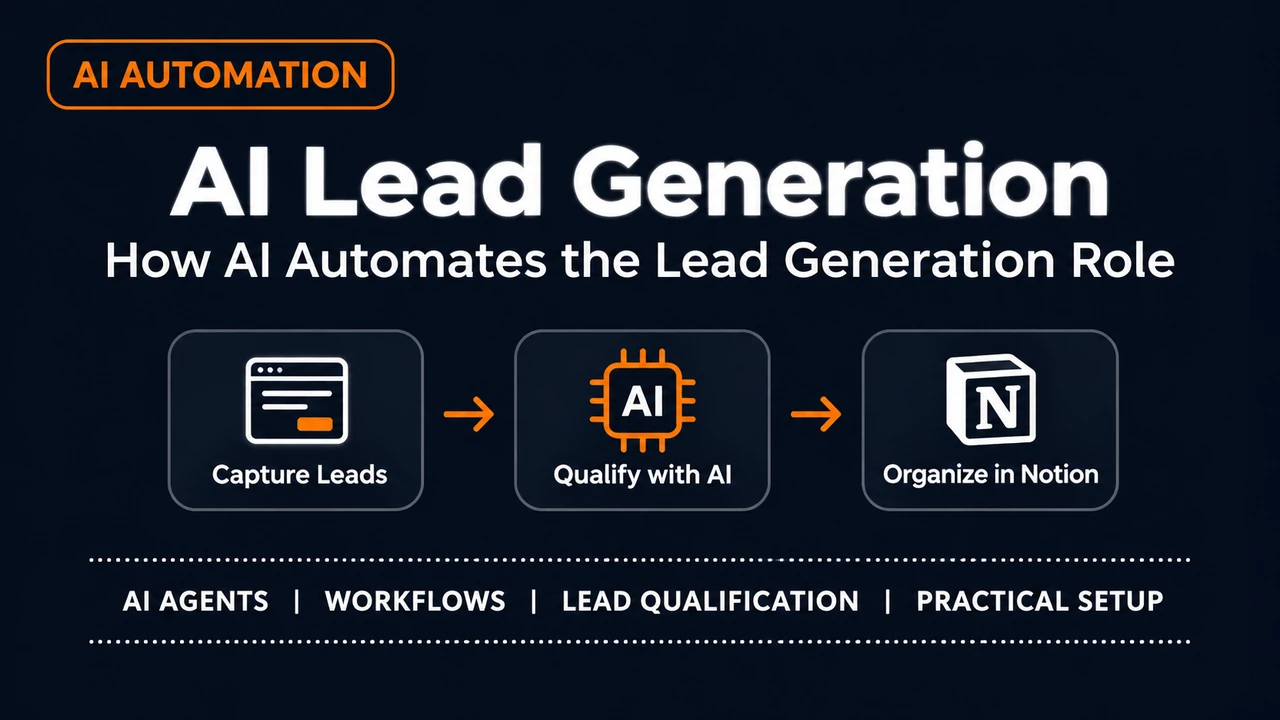
AI lead generation enables a business to use AI to find potential customers, take the enquiries, assess the quality of the lead and then support the follow up. Rather than doing it all manually you can connect the AI tool to your forms, your workflow automation and your central database.
But adding in AI doesn't automatically lead to better leads. The results are entirely dependent on the quality of the data that you're collecting, the criteria that you use to qualify your leads and the way that you actually go on to follow up.
For small businesses the real practical opportunity is to automate the repetitive bits of work and still have people involved in the key decisions. One way of doing that is via a workflow built on n8n, Gemini and Notion.
What is AI Lead Generation?
AI lead generation is the use of AI to assist in the process of finding, attracting, qualifying and managing leads.
Traditional lead gen would be a case of manually going through the enquiries, checking the contact details, sorting the prospects and deciding which ones you wanted to look at first. AI can help with some of that process by looking at the information that's been submitted, categorising the enquiries, spotting any missing details and then prepping the information for review.
IBM's guide to AI for lead generation covers prospecting, lead qualification, data analysis and personalisation of outreach.
These capabilities can help a business to manage its lead generation process. They don't in any way guarantee that a lead will become a customer.
The distinction is vital: AI can assist in the lead assessment process, but the business itself still needs to have clear qualification criteria and a good way of validating the assessment.
How does AI lead generation work?
Practical AI Lead Generation Workflow: n8n, Gemini, and Notion
A small business doesn't necessarily need an expensive sales platform to manage its incoming enquiries. A simple website form, some workflow automation, an AI model and a central database can be a very practical starting point.
To look at how all of those pieces work together we've put together a lead capture workflow for Flamica using n8n, Google Gemini and Notion.
The objective was very specific indeed: to take an enquiry, assess its merit, get the result organised and make it available for human review.
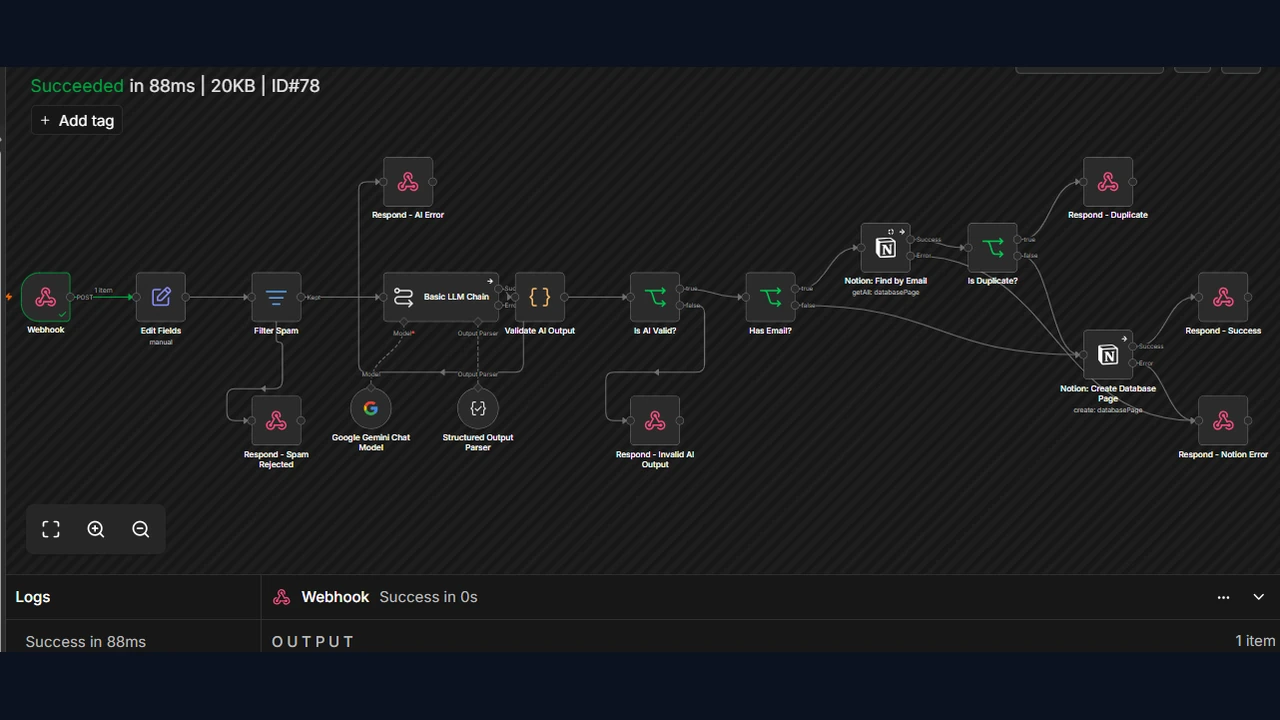
Step 1: Capture the enquiry
The process starts with a form being submitted. The visitor provides their name, email address, company and message.
For our local implementation test we used a separate HTML test form which fires a POST to a local n8n webhook.
This is important. The test form was designed to validate the workflow without in any way altering Flamica's live contact form or its current integration.
Step 2: Validate and filter the submission in n8n
The webhook takes the submitted data and passes it on to n8n.
The workflow starts off by normalising the fields (trimming off any unnecessary spaces, standardising the email addresses etc). It then checks the honeypot field which is used to identify the submissions that should be treated as spam.
Any submissions caught by the spam filter are stopped prior to even reaching the AI classification stage.
This is a key design principle: basic validation and filtering should occur prior to sending the data on to the AI model.
Step 3: Use Gemini to assess the enquiry
Submissions that pass the initial checks are passed on to Google Gemini via an n8n Basic LLM Chain.
The model picks up the enquiry and applies the qualification rules as defined in the workflow. It returns structured information, including:
- Classification of the enquiry
- Priority
- Reason for the assessment
- Summary of the prospect's stated requirements
- Recommended next action
A Structured Output Parser will help the workflow to get the response in the expected format.
The next validation step is to check that the AI response contains the required information and acceptable values. Invalid output is sent to a separate response rather than being considered a valid lead assessment.
Structured output makes the information far easier to parse, but doesn't in any way guarantee that the model's judgement is correct. The original query is still of course the one that needs to be reviewed by a human.
Step 4: Check for duplicates and store the lead in Notion
If the enquiry contains an email address the workflow will check the Notion database for an existing record using that email address.
If a matching record is found the workflow will identify it as a duplicate and won't create a further lead record.
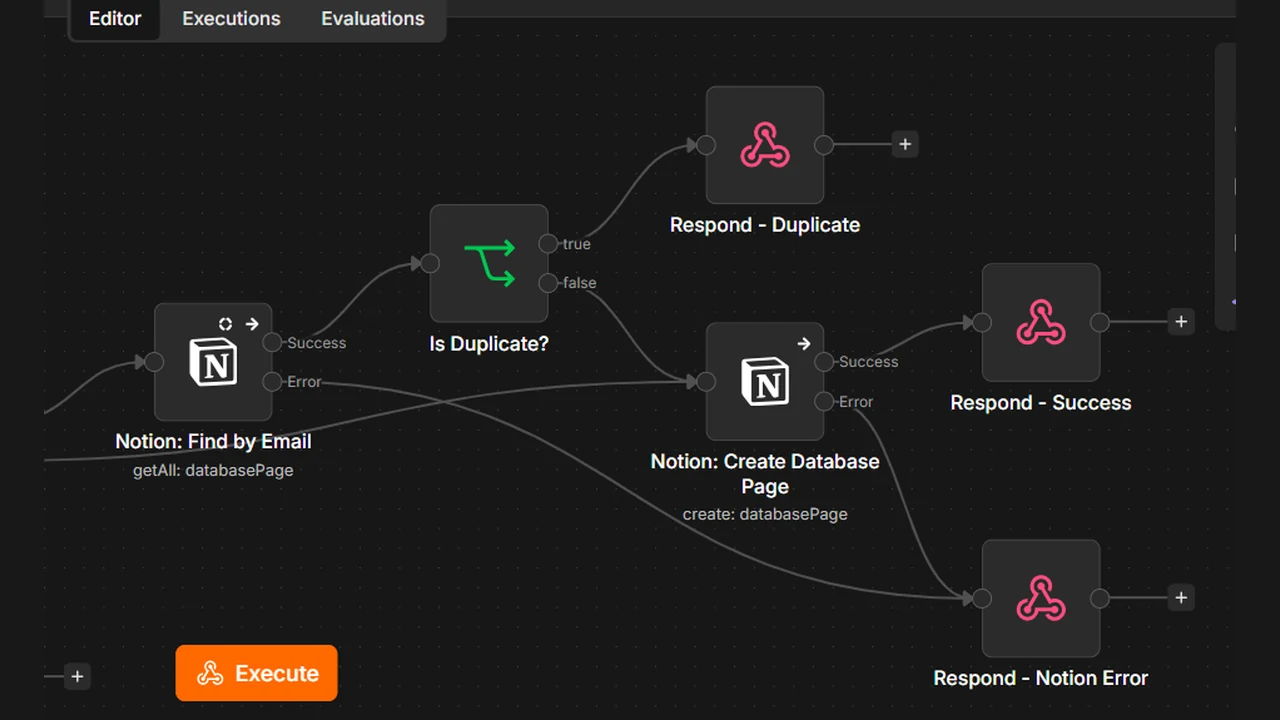
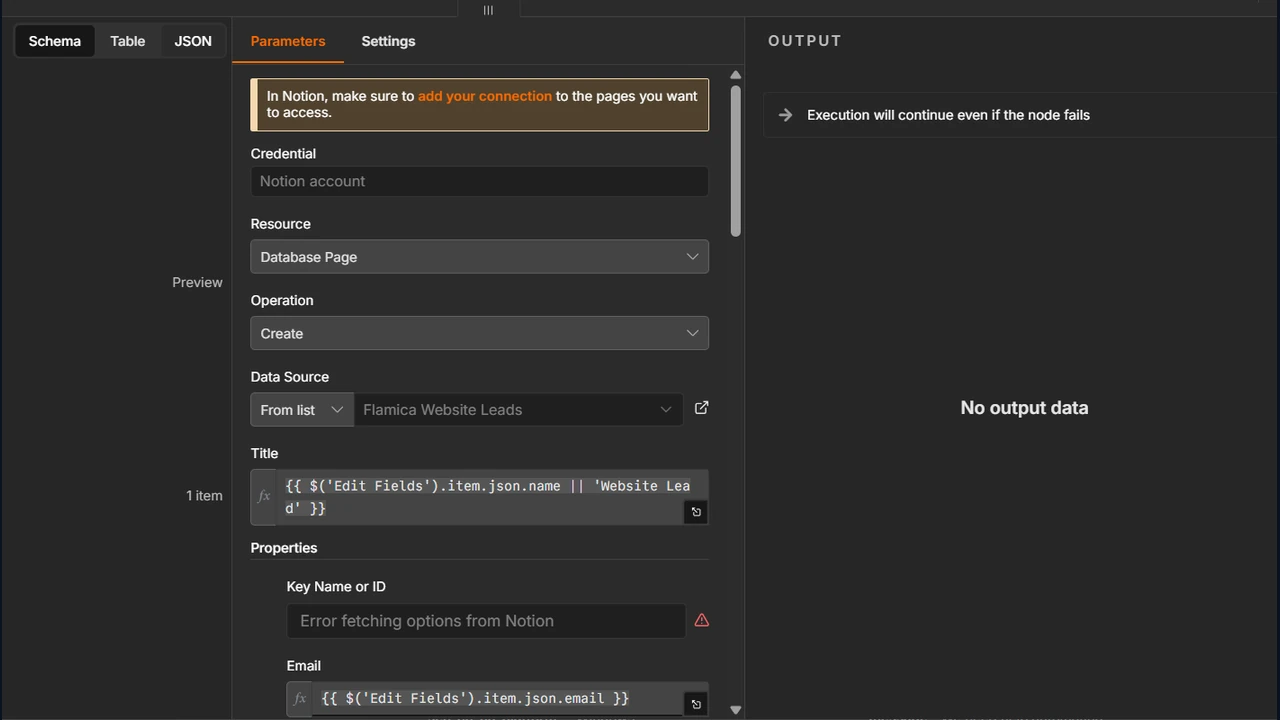
If no match is found the workflow creates a new Notion database page. Submissions without an email address go down a different route rather than being processed via the email based duplicate lookup.
The Flamica Website Leads database stores nine properties:
- Name
- Company
- Message
- Priority
- Status
- Reason
- Recommended Next Action
- Date Received
This gives a person a proper structured view of the enquiry and the model's assessment without in any way losing the original message.
Step 5: Review the result and decide what happens next
The workflow will prepare and store the classification. It will not go out and contact the prospects, negotiate with them or make any commercial decisions on their behalf.
A person can go through the original enquiry, the classification, the reason and the recommended next step prior to deciding whether to reply, ask for further information or simply say no.
Automatic follow up drafts and notifications could be included in a later version, they are not capabilities of this implementation.
Which parts of lead generation can AI actually automate?
AI lead generation automation is most useful when it's dealing with repeatable tasks that have a clear set of rules and a clear review process.
Not every task needs an AI model. Standard automation rules are often the way to go for fairly straightforward tasks such as checking that a field is populated or setting a status. AI is more useful when you're looking at interpreting natural language or summarising an enquiry.
Combining the two can make for a much easier to control workflow.
What we tested in the Flamica workflow
A workflow should be assessed with a range of different types of submissions, not just one example of a successful submission.
We carried out four live end-to-end test scenarios using the rebuilt local n8n workflow:
The audit also looked at eight offline checks: workflow routing, validation logic, error handling configuration, Notion property mapping and the local form.
These weren't eight additional live end-to-end submissions. The AI provider and Notion error paths were checked via configuration and offline tests rather than as live service failures.
The four live scenarios demonstrate that the rebuilt workflow can take a test submission, classify the various types of enquiry and deal with a duplicate without creating a second record. They don't demonstrate any production performance and do not in any way prove that the live Flamica contact form is in fact linked to this rebuilt workflow.
Workflow summary
Local test form → n8n webhook → field normalisation → spam filter → Gemini classification → output validation → duplicate check → Notion record → human review
The value of this design is not that AI is making all the decisions. It's that the routine processing is going through a defined sequence and the business has the information it needs to check the result and decide what to do next.
Implementation note: This is a locally tested Flamica workflow. The rebuilt n8n workflow is still inactive and the existing production contact form integration has not been altered as part of this test.
Can AI identify high intent leads?
AI can be used to spot signals which suggest an enquiry may be of interest to the business. A prospect may describe a particular problem, may be looking for a service that we provide or may have a very realistic project timeline.
A business could define rules around those signals and have the AI model evaluate the information against them.
However an enquiry that looks promising is not necessarily a confirmed buying intention. The information could be all over the place, it could be out of date or it could simply be ambiguous.
A sensible process should therefore:
- Define what a qualified lead means to the business.
- Use only information that is relevant and lawfully obtained.
- Ask the model to justify its assessment.
- Flag any missing details and any cases that are in any way uncertain.
- Review classifications against actual outcomes.
This approach makes qualification more transparent and gives the business a way to improve its criteria over time.
Can AI replace the human in the lead generation role?
AI can do some of the repetitive tasks, but that doesn't mean it can replace the entire sales role.
AI is of course well suited to the tasks of sorting through enquiries, summarising the information that's been submitted, applying a set of criteria and drafting responses. People are still required when the prospect has a complex need, when the assessment is in any doubt and when a commercial decision is being made which requires some context.
A hybrid process can divide the work more clearly:
- AI and automation: process information, apply rules, classify the enquiries, draft.
- People: set the qualification criteria, look at the exceptions, check the significant claims, build the relationships and decide how to go about the valuable opportunities.
Whether or not a business should go further with automation of its sales process is going to depend on the length of its sales cycle, the complexity of the offer, the quality of its data and the consequences of a bad decision.
The real issue isn't just whether AI can replace a sales rep. It's which tasks can be automated in a reliable way without compromising the quality of the customer experience.
How to Measure Whether AI Lead Generation Works
A working automation in itself is not proof of business value. You need metrics that demonstrate that the process is in fact improving speed, data quality or sales outcomes.
Start with a small set of metrics.
Define each metric consistently prior to collecting the results. For instance, agree in advance on what constitutes a complete record and what constitutes a qualified lead.
Wherever possible record a baseline prior to introducing the workflow and then compare the same metrics post implementation, using the same time periods and same lead sources.
Don't attribute every improvement to AI. Changes to traffic quality, offers, sales process or lead volume could also be the cause of the improvements.
If the workflow hasn't been evaluated against real data yet then you'd present those metrics as a measurement plan rather than as evidence of performance gains.
Risks to Consider Before Automating Outreach
Lead generation automation can be a problem if a business is sending out messages without any proper checks in place and/or using contact information without a proper basis.
Protect email deliverability
Google's email sender guidelines cover the various aspects of sender authentication and other requirements which help the email providers to assess an incoming message. Businesses should also be monitoring spam complaints and making sure they're meeting the relevant unsubscribe requirements.
Automating the outreach in no way eliminates the need to maintain a good sending reputation. Sending out high volume, poorly targeted messages is going to damage your deliverability rather than improve your results.
Respect privacy and marketing rules
The EC have guidance on the use of third party contact data for marketing purposes and the US FTC have guidance on the key requirements under the CAN-SPAM Act.
The rules that apply will be different depending on who you're contacting, where they are, what type of message you're sending and what channel you're using. A business should always check the relevant rules prior to collecting any contact data or sending out any automated marketing messages.
Publicly available contact details in no way imply that every use of those details is permissible.
Keep a person responsible for the process
AI can make classification errors and can produce a very confident explanation which is in fact wrong. There needs to be a mechanism in place to flag the uncertain cases, to correct the records and simply not take the automated action if a validation check fails.
For a small business these are part of a workable lead generation system rather than an optional extra.
Conclusion: Automate the Process, Not the Judgment
AI can be used for lead generation in the sense that it can take the enquiries, gather the prospect info, assess the potential fit and then go on to prepare the follow up. n8n, Gemini and Notion can all be part of that process.
The best place to start is with a very narrow, testable process: capture the enquiry, check the details, classify it against very clear criteria, record the outcome and then decide what the next step is.
Then measure what changes. Look at processing time, record quality, classification agreement, follow up speed and qualified lead conversion. Only extend the workflow if the evidence supports it.
AI can make lead handling a lot more systematic. The business will still have to define what a good lead is, will still have to protect the prospect data, will still have to make the key decisions and will still have to get a useful response out of it.
Frequently Asked Questions
1. What are the best AI lead generation tools for small businesses in 2026?
The right tools will depend entirely on the nature of the business. For a workflow that takes in the enquiries, classifies the leads and stores the results you could use n8n to orchestrate the automation, Google Gemini to interpret the enquiries and Notion to store the lead records. Other businesses will have different needs and will require different toolsets (prospect research, CRM integration, outreach etc) — you can explore our comparison of seven top platforms in our AI lead generation tools guide.
Compare the tools on the basis of what they can do, what integrations they have, how much they cost, how they handle data and how easy they are to maintain.
2. How can I automate lead generation using AI agents and workflows?
Start by mapping the journey from enquiry submission to follow-up. Use automation to validate the data, apply spam filters, route the appropriate enquiries to an AI model and store the classification in the database.
For instance n8n can orchestrate the workflow, Gemini can assess the enquiry and Notion can store the result. Test the process with appropriately selected examples of incomplete, unsuitable and duplicate submissions before you go any further.
3. Do AI SDRs and agents actually work?
AI SDRs and agents can perform a wide variety of sales support functions (prospect research, enquiry classification, information processing, follow up preparation etc). Their effectiveness is a function of the quality of the data, the quality of the instructions, the quality of the integrations and their ability to deal with exceptions.
Measure their performance on qualified lead conversion, response time, classification accuracy and the amount of human correction required.
4. Can AI SDRs fully replace human sales representatives?
AI can automate some of the tasks of a sales rep, but complex conversations, relationship management, negotiation and commercial judgement are generally things that require a human.
A hybrid approach enables businesses to automate the boring, repetitive tasks, with people still in charge of the key decisions and the customer relationships.
5. What is AI lead generation and how does it actually work?
AI lead generation uses AI to help businesses to identify, assess and manage their leads. That generally involves the capture of the enquiry, validation of the data, classification of the lead, storage of the result and then the ability to follow up.
The business has a set of qualification criteria and will go through the key decisions. AI is used to assist with the process, but in no way guarantees a sale.
6. How can I use AI to identify buyer intent prior to the prospect even filling out a form?
Businesses can look at the relevant website activity, stated interests, past enquiries and appropriately sourced intent data. AI can be used to collate that and spot the patterns that might indicate interest.
However those signals don't prove that anyone intends to buy. Use lawfully obtained information, be mindful of privacy requirements and compare the inferred intent with actual enquiries and actual sales.